


Samsung UpStage M620 – Sprint 179

Sprint - Samsung M620 Upstage Front Sprint - Samsung M620 Upstage Back

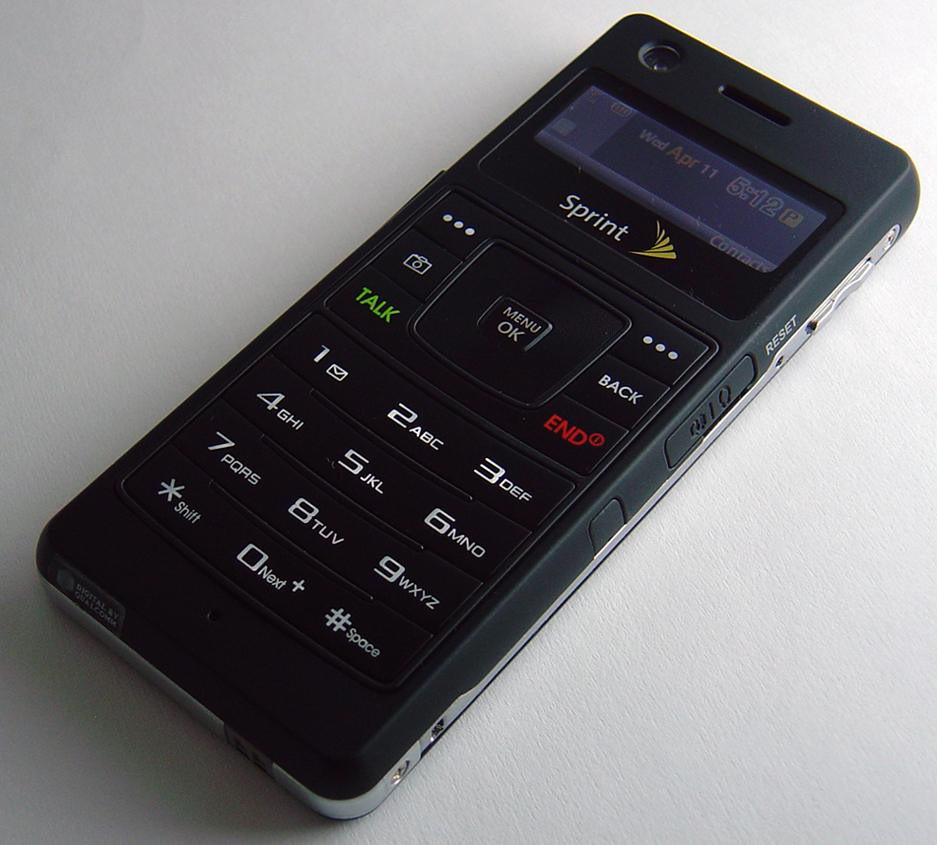
Last week Sprint announced the availability of the Samsung UpStage (aka SPH-M620). Sprint was kind enough to provide Skatter Tech with a unit for review. The dual-sided UpStage is notable due to having a phone on one side and a iPod-like Mp3 player on the other.

Although the phone is extremely compact, at first glance, the front side of the phone looks dull due to the tiny LCD display. However everything changes after turning the unit around to the backside. In terms of basic features the Samsung Upstage features a 1.3MP camera, MicroSD, Bluetooth, and background Music Playback. As a bonus Sprint’s service allows access to 99 cent music downloads, Live TV, Internet Radio, Games, Web Browsing, and other Power Vision services.

Samsung SPH-M620 Specifications:

  • Provider: Sprint Exclusive (CDMA)
  • Form Factor: Dual-Sided Candy bar
  • Dimensions: 1.73W x 4.07H x .37D inches
  • Battery: Up To 6.3hrs Talk Time with Wallet
  • Screen: Front 176×65 & Back 176×220 pixels
  • Digital Camera: 1.3 MP with 5x Digital Zoom
  • Storage: ~53MB Internal + MicroSD (2GB max)
  • Sound: Standard Headphones with Adapter
  • Others: Bluetooth v1.2 + 4hr Wallet Battery
  • Price: $150 + Tax w/ New 2-Year Contract
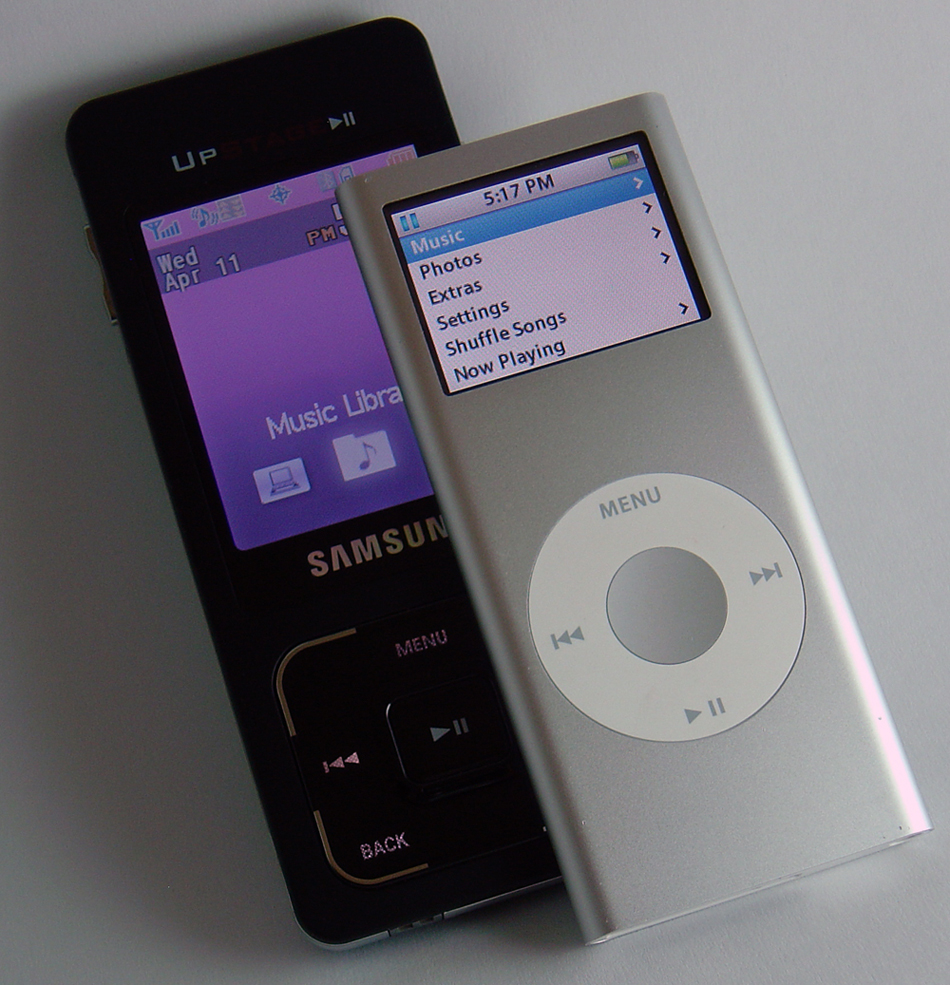
UpStage Body: 5/5 starsSprint - Samsung M620 Upstage Size
This phone is tiny, measuring only .37 inches thick, making it thinner than the Motorola RAZR. Although a bit larger, the phone resembles the shape and form factor of an iPod Nano. The front side of the phone has a Alpha-Numeric Keypad for making calls or text messaging. The back side looks like an iPod Nano, but with a large screen and an square touch pad. The phone is small enough to fit in most pockets and can be placed flat on its back or front. The phone almost doubles in size after placing into the battery wallet, which I assume most people plan to use. Although the case allows access to both sides of the phone, it still becomes quite tedious to keep switching back and forth. Despite the fact that the unit is harder to hold with the wallet, the flexibility of removing the case is an advantage.

Displays: 4/5 stars
The front display is extremely small only 176×65 pixels making it hard to read text. Navigating the front display is quite difficult since it can only fit about one-line of data on the screen at a time. Luckily most functions of phone are performed through the large/bright 176×220 pixel screen on the back side. Unfortunately since there is no keyboard on the back, you will find yourself having to “flip” back to the front side for data entry.

Music Playback: 5/5 stars
The UpStage supports playback of DRM-Free MP3s, WMA, AAC, and WAV in addition to music purchased through Sprint’s Music Store. Sprint now offers .99 cent over-the-air downloads of high quality tracks (with a data plan). Music can be sorted by Songs, Artists, or Genre in the interface, however due to the lack of a search function, scrolling through hundreds of track is tedious. We still prefer Verizon’s standardized music playback application, which works on most of their phones. One big bonus is the ability to “hide” the music playback app while listening to music and continuing with other tasks such as browsing the web or playing games. Album Art is displayed during playback in addition to the track title, duration, and artist/album. Also supports playlists & shuffling songs.

Speaker and Sound: 3/5 stars
For a “music phone” the lack of a decent set of stereo speakers might be problematic. The phone’s single (mono) speaker does a mediocre job, which functions as a speaker for calls and music. As the volume level increases, the sound begins to crack. Although this should be fixed in a future model, the issue should be non-existent since most people will use headphones for music. (Adapter for standard headphones included.)
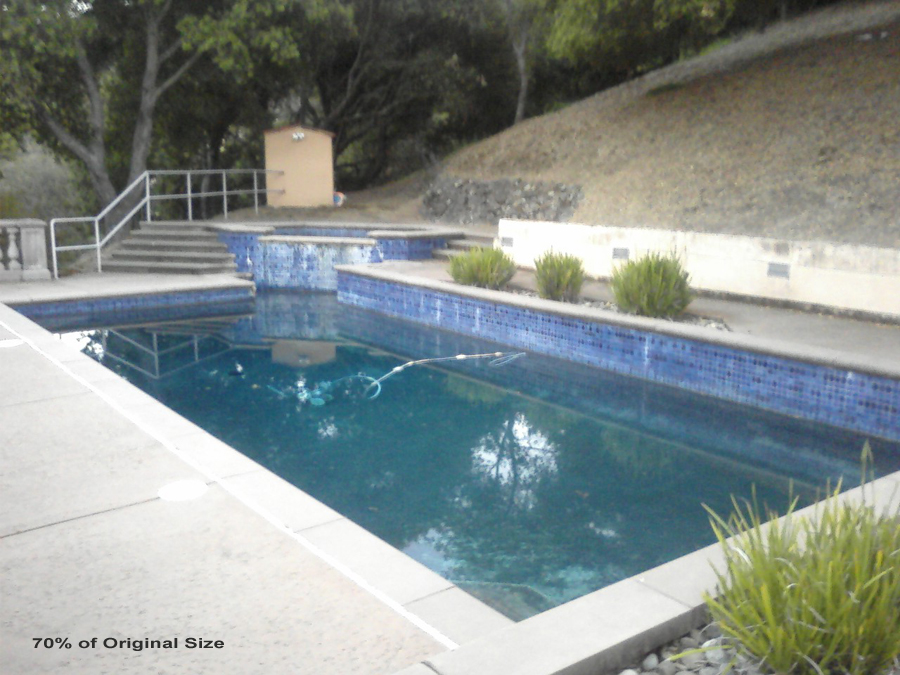
Digital Camera / Camcorder: 2/5 starsSamsung M620 Camera
The camera on the UpStage remains a mere 1.3 mega pixels while most new phones on the market are now 2.0. When the camera is activated, you must flip the phone around and use the large LCD on the back as the viewfinder. From our results, the image quality was mediocre and images were blurry even in well lit situations. Video clips may be recorded for a duration limited only by MicroSD capacity, however clips longer than 30 seconds may not be mailed. The small front LCD functions as a tiny viewfinder for self-portraits.

Battery Life: 5/5 stars
Unlike the majority of phones on the market today, the UpStage does not have a removable battery. Instead, the UpStage has a battery built into the unit. Since the unit is small and the talk time is only about 2.5 hours long, Samsung provides a battery wallet with the phone. When the phone is in its case, the talk time increases by over 4 hours. (up to 6.5 hours) Since the case is easily removable, you’ll have the freedom to choose whether you want the additional battery life or light-weight phone to carry around.
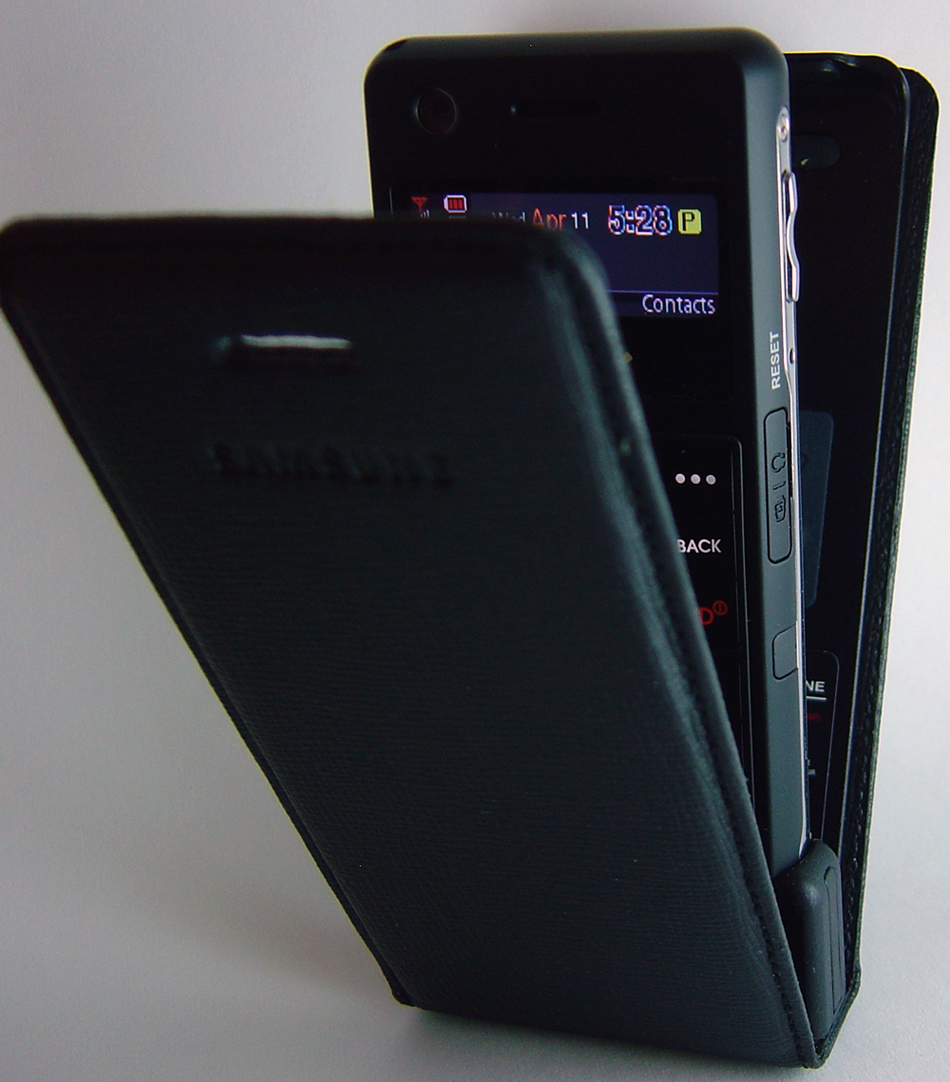
Samsung M620 Upstage Battery Wallet

Usability & Interface: 4/5
The interface on the front is a joke, it only allows performing four menu actions: view call history, find contacts, add a contact, or send a text msg. Other than that, the only other use of the front is to display caller id, date/time, battery life, signal, and Bluetooth status. The interface on the back is a different story. The back is controlled by using the square touchpad at the bottom. UpStage users must make up & down motions on the left/right sides and left-to-right motions on the top & bottom instead of using circular motions to navigate as you would do on an iPod. (Apple Patent!) In addition the top left/right corners act as soft keys while the other labeled parts are the Menu, Back, and End buttons. The only hark key is the center Select/Play button. Although navigating becomes quite easy after a bit of practice, data entry will remain a hassle. For example, while browsing the web (back side), you’ll have to flip over to enter the URL text and then flip back to view the page. Some applications support an onscreen keyboard, however you’ll find yourself flipping back & forth a lot.

MicroSD: 4/5 stars
Like most phones on the market today, the M620 supports up to 2GB MicroSD cards. Since Samsung intends this phone to double as a MP3 player, as a bonus, they include a USB data cable, which most cellphone makers do not. The included CD assists installing the necessary drivers. When placed in “Sync Mode,” the phone appears as a disk drive. Windows XP users can either manage data themselves or use the included application. Mac OS X users must manage the data on the MicroSD themselves since the included software is Windows Media Player based.
P.S. 1GB microSD cards cost only about $12. 2GB microSD for ~$25
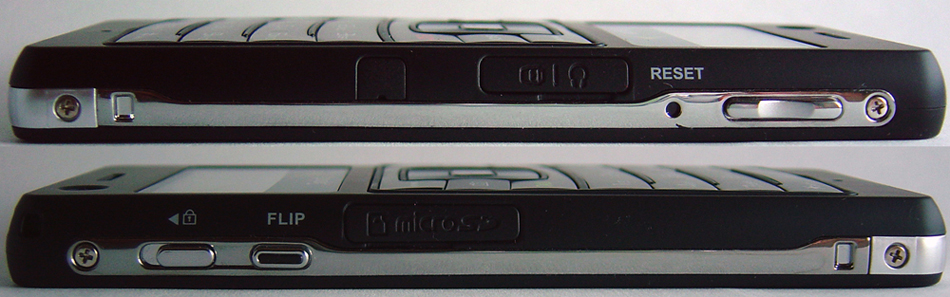
Sprint - Samsung M620 Upstage Sides

Bluetooth: 5/5 stars
The Samsung M620 uses Bluetooth 2.0, which supports the use of Stereo Headphones for music playback, in addition to standard headsets. The Bluetooth can also be used for transferring contacts, printing photos to wireless printer, and to connect to computers for use as a wireless modem. Another new feature is Audio Caller ID, which reads out a name or phone number when using a bluetooth headset. From our testing, sound quality was excellent there were no issues with pairing devices or other features.

Sprint Power Vision: 4.5/5 stars
At this time most Chatting, Navigation, and Gaming apps are not yet available for the M620 due to compatibility issues because of the unique controls, however new working versions should be available soon. Applications such as Google Maps Mobile and Opera Mini work great. The On Demand section provides access to News, Weather, Movie Show Times, Maps and more. Sprint Power Vision offers access to thousands of clips and Live TV channels such as ABC, FOX, MSNBC, CNN, and Comedy Central (plus radio). One of my favorite features is the built in Podcasting client, which streams any podcast you choose directly to your phone without the need of a computer. Saves the hassle of having to sync new files.

Designs similar to that of the UpStage have been available in Asia for a while, yet this marks the release of the first dual sided phone in the U.S. Although we like this phone a lot for its new innovative and compact style, text entry remains a hassle and is probably the #1 problem. Other than that, another thing we found frustrating was that songs you own may not be used as ringtones. Anyways this is one of the best phones Sprint has had in a while, therefore if you are ready to upgrade you should consider this. The Samsung UpStage is available in Sprint Stores and Online now for $150 + tax with a new 2-year contract. In my opinion this is quite a good deal since Sprint includes the Battery Wallet, headset adapter, USB Sync Cable, and a 64MB microSD all of which is not normally included.

DEAL ALERT: FREE Samsung UpStage (M620)
Links: Sprint.com | SPH-M620 Spec Sheet
Product Shot: High-Resolution UpStage Image
Help & Support: fourms.skattertech.com

179 Comments

Write A Comment

pasht says:

“another thing we found frustrating was that songs you own may not be used as ringtones.”

Does this mean that if you threw some mp3′s on it from your PC, you could *not* use those as ringtones?

sahas says:

Yes, we were only able to use the ringtones purchased from Sprint. Even songs purchased from the Sprint Music Store can not be set as ringtones. However I guarantee there is some sort of workaround (“hack”). We haven’t taken the time to look for one. If you know of one let us know!

pablo says:

It is possible to use your personal songs as ringers. You must first cut the song to the part that you want and then convert it to AAC(itunes) and then use an uploader (search google). Then with your phone go to the url provided from the uploader and download it.

afternoon dlite says:

i got the phone and where you have the usb connecter, about a 1/4 of an inch away is another slot, i removed the cover and there is something under like a connecter or something, and i was wondering if you knew what that is for. thx

afternoon dlite says:

oh and to the last comments, if u record a video of a song, (i did anchorman singing afternoon delight)you can put the bideo as your ringtone, and when you get a call, the video is played on the large screen, quite nice. btw to make the video your ringer just go to settings, sounds, ringer type, voice calls, with caller ID, my videos, in phone, or memory card (depending where you saved your video

questions says:

i am wondering how difficult texting is because i text alot and i was wondering if it is really annoying to text with.

sahas says:

If you text a LOT, this is definitely not the phone to purchase! It is quite annoying to type a text message even once in a while. The best phone we’ve seen for TXT is the LG enV VX-9900 for Verizon

questions says:

Is there any phone that you would recommend for easy texting that Sprint offers?

Dean Patel says:

@question
If i were you i’d get the moto Q or a blackberry. those are pretty sick. my brother has the upstage and you have to use the screen on the front to send texts and the font is hella small. i’d just get a standard flip phone from sprint or a smartphone that is cheap. anyways thats my 2cents. i’m out.

meghan says:

i heard that if you get a blackberry you have to pay and extra amount of money a month. Is that true?

baseball10 says:

i just got an upstage and my friend sent me some ringers through bluetooth and the only way i can axcess them through my “mass storage” folder and i cant set them as my ringers. how do i do that.

sahas says:

@meghan
I could be wrong, but from what Sprint’s website says, you do not need to pay anything extra. If you want to check email or browse the web you’ll need to purchase an additional data plan which are usually expensive.

@baseball10
Sprint has locked the option to set your own files as ringtones, therefore you’ll have to use an “uploader” to get the audio file onto your phone as a ringtone.

estty02 says:

hi i just bought an upstage and i set the text messaging alet volume to 8 but can stil barely hear it , do u know how to get around this ?

Joel says:

I have this phone and texting is rather easy an Im not that wekk versed in texting. I love the phone, the tv and radio is great, not to mention the music player. The volume is phenomonal and I Love it.

Skynet says:

I have had the Upstage for 2 weeks now. HTe more I use itthe more I like it. I have used several mp3s as ringers by using a phone uploader website, it automatically converts the file and puts it in the right folder in the phone, all it costs is one text message, and airtime to download the file.

iceman9326 says:

the m620 is a really nice fone… but from what I hear is that the fone as been crashing a lot!!?!? does this happen to any of u???? let me know?

sahas says:

I hear is that the fone as been crashing a lot!!?!? does this happen to any of u?

YES. The phone does at times randomly restart and shutdown. Usually occurs while trying to run some application, not an issue with basic functions such as calling. It also has a few control issues and GUI errors. However I am not too worried about this since, new firmwares are released ever few months. When the next major update is released most of these issues will probably go away.

zboot says:

In your review – you mention that the phone must be flipped in order to use the camera. Given that the lens is on the phone side, how is that a problem? Nobody (unless you’re taking a self shot) takes pictures with the lens pointed at them.

sahas says:

@zboot
It isn’t a problem. It is quite natural to have that camera form factor. I hope I didn’t infer that it was a problem. The reason the rating was low for the camera was almost entirely because the quality was poor, bad focus, blurry pics, and a lack of a flash. Anyways, your point is quite valid.

mami says:

do you know a site i can go to to take my mp3 songs and break them down to 30 seconds in order to actually make the ringtone itself??????

Rick says:

Does anybody know if contacts or phone numbers can be set to “secret” or hidden? It looks like they left that needed feature out of this software version…we really need that back……

KR says:

Samsung UpStage M620 Sprint It’s the best junk phone, u cant select a ringtone that is downloaded from other phone as well. Ringtones are like giving life to the phone and sprint wants u to buy from them but not to use what we have. I have 20 second mp3 file, still it doesn’t showup in my contents > ringer folder. it stays in the filemanager and you cant move it around to make it a ringtone.

KC says:

You can upload your ringers here http://www.phoneuploader.stellernet.com and then download them to your phone in my contents to use as contact, text message & voicemail ringers.

SMD says:

I’ve used furture dial (snapdialer) for internet in the past but it doesn’t work with Vista or the upstage. What are my options (other then subscribing to internet)?

Kimberly says:

When ever I want to listen to my songs it has to load each of the songs individually before I can even see my playlist, is this normal?

JM says:

Is there a place on the upstage to plug in headphones on it.

sahas says:

[Comment ID #27154 Will Be Quoted Here]
There isn’t an actual headphone slot on the phone itself, but a adapter is provided which plugs into the power/headphone slot and you can then connect any standard pair of headphones into that.

Unknown says:

I just wanted to says that I have this phone and it is great. The camera is fine and if you want to take a picture of yourself you can flip it and see yourself on the other screen. As for ringers you can take an mp3 and convert it to a 3g2 file (the movie format the phone uses) then use it as a video ringer. Only problems I have found is that the first hald second of mp3s are cut off, the skin for the mp3 player can be changed but doesn’t save so you have to chane it everytime, and of course the fact that mp3s cant be used as ringers. Anyway, I contacted Samsung and an hoping for a productive response. Hope this helps.

Domenik says:

i got the upstage and i was tryin to put my mp3 as ringers how do u do that

Erin says:

I have read that the phone side sucks for texting and contacts due to the really small screen. BUT, I didn’t read anything about the voice dial option. How does this work? Is it good enough to make having to access your contact list obsolete?

sahas says:

“the voice dial option. How does this work?”

the voice dial is decent, however it is quite slow to load. On most other phones with this feature the application loads almost instantly after pressing the voice key either on the phone or via bluetooth headset. However on this UpStage it takes about 2.5 seconds for the app to load. Therefore it takes about 10 seconds or more before you can actually end up calling a person.

Dv says:

For Display > Backlight settings > When I turn the Power Save Mode ON, the screens (both sides) never shut off. When I turn Pwr Save Mode OFF, the screens turn off after the 8 seconds that I have the backlight set for. Seems backwards to me.
Also, when on the Web > Search > I am using the Large LCD screen. Unable to type any text in while on the large LCD sceen. If I flip > it kicks you off the Web. How do I search the web and enter text in the Yahoo search field?

I was surprised that when I loaded the Sprint Music Manager on my PC, it found my entire IPOD library. Was able to pick and choose what IPOD Lib songs to load onto the phone. This is a great function. The songs sound great on the phone.

One other comment > the phone takes 3 hands working together to disconnect the extended battery from the phone. Over time, I’m sure I will break it. Plan on leaving it connected from now on. Wish it had a velcro tab so you could fasten the one side of the cover so it doesn’t flap around. Any ideas?

sahas says:

@Dv
The power save is a bug and Sprint is aware of the issue. They were suppose to roll out another firmware upgrade soon, hopefully fixing this issue. Your phone is not the only one with the problem.

I like the case since it is protective however it is quite annoying to keep having to flip back/forth with the case on. In addition it is slightly uncomfortable to speak with the leather flap down since it hits my mouth. I have no choice but to use the case since the battery life is too short with out it.

Dv says:

OK thanks about the Pwr save Mode bug. Not a big deal as it works fine with the opposite setting. I’m still confused how to type text in a web search field while on the Web. Have a feeling this is impossible for this phone. I have the Vision Plan and still can’t get the TV mode to work on one of the avail TV selections. Managed to play a video clip just fine.
If I want to listen to music, can I use a bluetooth headset to listen? The cable that goes in the battery recharge slot is so you can plug in earphones but this connection slot is vulnerable in breaking due to the design. Plan on using only for recharge.

Edit: Ok, got the TV to work just fine. Another bug maybe > on the small LCD, managed to get an orange “searching for signal” text stuck on and slightly overlapping the date/time. The phone showed I did have a good signal but the orange text never went out all day. I turned phone OFF and tried the “Reset” pin button. It finally went out.

Question asked back on 4/14 but not answered. Can’t find in manual. > on same side with reset and USB connecter, about a 1/4 of an inch away is another slot, (small square). What is this for?

Dennis says:

if you want any rigtones on your phone, go to fry’s and get podmaxx 07

Dennis says:

when i downloaded my sprint music manager and tried to download songs from my computer, the music manager tells me that my phone is not hooked up to my computer. although my phone says “connected to computer, phone disconected”?????? any thoughts?

Dv says:

Dennis, I used the USB cable with the music manager and everything worked fine. Might try to Pwr down your phone and push a paper clip into the reset slot and hold. I had to do this once due to a stuck message on the small LCD screen. This fixed the problem.

Rickfromphila says:

Does anybody know if contacts or phone numbers can be set to “secret” or hidden? It looks like they left that needed feature out of this software version…we really need that back…anybody have any idea?

Dennis says:

hey all, got my songs downloaded, just reinstalled the software.

David says:

I will be updateing my phone in a few weeks I was thinking about getting the upstage is it really worth getting or not and how many songs does the phone hold I really dont want to get it if it only holds 6-10 songs

sahas says:

how many songs does the phone hold

If you want to use this as an MP3 player, as most people do, you need to purchase a microSD memory card to pop into the phone. The UpStage it self has barely any space for storing music internally. The cards are EXTREMELY CHEAP. On Amazon you can get a 1GB MicroSD for ~$7 and a 2GB MicroSD for about $23. You should be able to hold plenty of songs with either one.

Rickfromphila says:

Telenav…or Navigator…doesn’t work yet?
The phone can tell you, your approximate location…but hardly ever works in Televav/Navigation mode. Nor does the compass…and I’ve been a lot of places, including open fields to try it…to nearly no avail. Also…has anyone heard whether they will put back the “privacy” feature for certain phone numbers? A lot of folks are complaining about this on the net….it is even featured on some of the cheaper samsung phones….

Dennis says:

i have a 2 gb chip and i have 200+ songs on my upstage

DangeRus says:

[Comment ID #26210 Will Be Quoted Here]
[Comment ID #26210 Will Be Quoted Here]

Russ says:

Does anyone know if you can download pictures from your computer and view them on the Upstage?

vega11220 says:

ok guys I have the upstage and I found a way to put ur own ring tones and pics as wallpapers. Go to this web site its the best I have my own ring tones free its about 30sec and the wallpaers u do it ur self here the web site is http://www.mixxer.com if u guys have any question on this hit me up 646-221-1463 its easy and free

ty says:

does anyone know if u can upload videos from your computer to the upstage? ive even tried converting them to 3gp but the sprint music manager doesnt add em to my library? got any ideas?

curt says:

it has to be 3gp2, not 3gp

curt says:

also, 3gp2 resolution has to be set to the correct specs, somewhere around 177×144

ty says:

okay. then after u convert em to 3gp2 do u add em to the sprint music manager or can u upload em to a website like funformobile.com then download them from there

M_B_P says:

Hey how do you guys upload your own ringtones on the Upstage! Is that through an uploader website! And if through a uploader website, do you get charged for any sprint vision charges when you download the ringtone???

vega11220 says:

yes u go to mixxer.com and its free. its that simple pics and ring tones there.

M_B_P says:

ok i got the mixxer.com thing, but my second question is when that uploader sends the ringtone to the Upstage are there any Spint Vision Charges when downloading the ringtone???

www.com says:

Do you think an Upsatage is better than a Razr?

terrorific says:

if you dont pay for internet sprint still charges you 3 cents per kilobyte which will be like 10-15 dollars a ringtone lol. They purposly cripple the phone so you have to buy their internet to use custom ringtones.

melissa says:

the fact that even if you buy ringtomes you can’t use them. what kind of phone can you NOT use ringtones, and it dies so fast. It was very exspensive and i like how it’s very light but the flipping can get annoying. just please someone let me know about ringtones.

melissa says:

to the comments above me yes it’s better than a razor and yes sprint does alot of stuff like that. Personally i would switch If i wasn’t bounded to my contract.

Chill says:

{for anyone that actually texted with the upstage} do you use the small or big screen when you are text messageing

terrorific says:

you can see 3 lines of text in the small lcd on the phone side. Its just like regular texting. On the mp3 side you use the touch pad to scroll thru letter, it seems very slow, you even have to scroll up every time in between z and a to hit the space button.

Dennis says:

hello everyone, i can’t seam to get the backlights on my upstage to light up when my phone rings any ideas.

Dennis says:

sprint has the worst customer service i have ever had the DISplessure to have had to deal with. 40 minuetes and i’m still on hold.??????????????
i gotta get the i-phone

chris sammartino says:

Has anyone tried a 4GB micro SD card for extended storage? I just got the phone and didn’t want to buy a 2GB card if I could get a 4GB card for a bit more. Samsung’s website indicates a 2GB card, but I assumed that it was published a while ago before the 4GB cards were available. Otherwise the phone works great. It’s nice having a really small phone that doesn’t make a bulge in my slacks pocket at work!

john q says:

I have downloaded sprint modem software and installed the cd that came with the phone but the dialer software doesnt recognize my phone as a modem, i have a pda phone and there i gotta run a modem sofware on the phone itself. any clues as were on the phone is this “enable phone as a modem bia USB setting?, thanks in advance

christy flores says:

hey well i just got my upstage phone. connected under crickets servise my ? was .. how can i transfer my pics on my fone to the comp.? i used the usb. cable. but nothing is comming up. . not having my fone under srint servise affects it?? thanks

chris sammartino says:

OK I found the answer to my issue, but figured I’d leave the info for all of you who may eventually face the same issue. If you buy a 2GB card the phone transfer may or may not work (that’s the Samsung answer). They say that the phone should use a 512MB chip and should work with up to a 2GB chip (which was a big part of my decision analysis). I was pretty pissed and almost returned the phone, but the work-around is to buy a 2GB micro SD card with SD adapter and use a USB adapter to manually copy .mp3 files to the card and don’t use the phone to transfer. It works!!! Down side is that you can’t view pictures also copied in the same manner. Good luck to all.

jason says:

how to do u put ringers on your upstage using a usb cable. Is there anyway to do it not using the URL or Text

JUAN says:

Help… Help… I woke up one day and my phone wouldn’t let me call anyone. Every person I tried to call said “call can not be completed” in a text version… So I turned off the phone to turn it back on, and it wont come back on at all… I think it’s a recall on this phone!!! But IDK Someone. Please help

firaso says:

can anyone help me out here please!!!…..how come i cant use my downloaded music from my pc as a ringtone and if there is a way plz let me know….thanks

danielle says:

fyi

in order to transfer pictures from the phone to the pc via the usb cable you must save the pictures to the memory card (either the one included with the phone, or a bigger memory card if youve purchased one)

you can get free ringtones via 3guppies.com (formerly known as mixxer.com). there is also phonezoo.com, but i prefer 3 guppies. you can make loner ringtones on 3 guppies (30 seconds, phonezoo only allows 20 seconds) and the ringtones come out loud and clear (but that also depends on the source of the tone, i.e. the quality of the song you used to make the tone)

ive had this phone for a while now, and i know pretty much everything about it… if you have any questions you can email me @ sosexy4afatchick@tmail.com (yes, i have a sidekick id as well lol)

aka says:

can you lock certain pictures on this phone

denise says:

hey everyone, my mom jst got me an upstage and i still cnt figure out y only 9 songs fit on it (pls help) my email is castillox3@yahoo.com

entregao says:

we just need to someone crack the sofware to use this phone as any phone of any other company.Sprint sucks! and i have to wait 2 yrs. of contract.DAMN!

alexis says:

i know this is a really crappy way of doing it but if you take a video of something on your cell you can make that into teh ringer. So if you take a video of a music video then it can be your ringtone. The sound isnt that bad….its just a thought…and thats wat i do b/c there is really no other way of getting ringtones

Keyon says:

I installed the cd-rom that came with my upstage but I can’t transfer the music to my phone

alexis says:

wat is the connector for the headphones?
i dont think i got that.

SabrinaJo says:

i don’t like this phone at all…ive had it since like june of this year and there are so many problems with it. when my phone dies and i turn it back on my mp3 side the screen on that wont work until my phone is fully charged. lately its been shutting off on me for no reason. it gets really hot when im talkin on the phone for some reason. and no it wont even turn on! when i plug it into the charger it comes on but only for a few seconds and then shuts off!! and it all started cuz my phone would not keep a charge for some reason! so is there anything i can do. and when i try reseting it..cuz ive had to do that after a week of having the phone it doesn’t work. it wont reset at all. i just think this phone is an all around junk! im sorry for those ppl who have it. but is there anyone that has been having these same problems with thier phone?

SabrinaJo says:

o and my email is frock_1990_09@hotmail.com if anyone has had these problems i would like to know and what they did about them!

unknown says:

i have a red upstage, this phone is awesome, why is everyone bothered by the front screen? txting is normal cause the font is small…unless your blind, then you dont have any business txting. and the batterie life is pretty good, if you need more batterie life, then you simply dont have a life??

Rickfromphila says:

Does anybody of a holder for the phone that can be used…(made for the upstage)….that will keep it in place in the car while using the Telenav?

It gets kind of hard to look down into the cup holder to follow the maps….

Thanks….

Demetrius says:

Is there a way to put ringtones on your phone using a USB Cable? Please Tell Need Help!!!!

unknown says:

how do you convert videos so that it can play on the upstage

keyon says:

my upstage will play music in mp3 format not wma and wva formats. how do i get to play other formats

Don says:

You need to use the included software CD to convert the wma’s to thier own mp4a format that will then play on the phone.

Stan Stubbz says:

is there a way to download a java handler on tha upstage cuz i really need dat to do stuff….if so tell me EMAIL: HITTHADANCEFLO@AIM.COM

Quen says:

I’m with that one person…how the heck do I get wma files to play or how do I convert them to mp3 or sumum…cus I have a million songs saved on my chip and half of them won’t play…and it’s really annoying to spend so much time downloading music and synching it for it to just sit there useless…someone PLEASE HELP

Stan Stubbz says:

is there a flash player u can download for the upstage???

David says:

well i have got the use of the upstage down to a science… first get audacity and cut the song to the part you like. then export as an mp3… then go to your music and the name has to be one word. then click the rename thing. change the .mp3 to a .3g2. to view all files go to start my computer and click the phone. then go to dcim. drag and drop the newly converted mp3 to 3g2 files into the dcim folder. then you can make it work. and as for the whole freezing thingy mine works fine. the only thing i would reccomend for this phone is getting a new momory card…

David says:

also the Beyonce version and red version are somehow made better than the black… oh well Red is my baby

jlynnology says:

“SabrinaJo” I just had this phone for like two days now and i’m having the problem where my phone was telling me I had no nework service after I tried sending a text and I turn off my phone to turn it back on to see if i’ll get the network service it said I didn’ have, but now, i’m sitting here at this very moment trying to get answers to why it won’t turn back on. I tried some of the things that ppl said, but it’s not working. My phone is off won’t turn back on.

If someone could please help me or give me other answerrrrs. Plllleeeaaaaseee help!

jlynnology says:

jlynnology@hotmail.com if someone would pelase give me anwers that would be sooo greattt and helpful thankkk youuuu so muchhh if you could do that

Sam says:

Yo David,

I tried what you did, but when I got to settings, sounds, ringer type, voice calls w/ caller id, then my videos, then to memory card and try to assign it as a ringtone…it said that media file saving has failed…what am I doing wrong?

ashanti says:

i just got an upstage and my friend sent me some ringers through bluetooth and the only way i can axcess them through my “mass storage” folder and i cant set them as my ringers. how do i do that.

big jim says:

you can record your music video and set it as your ringtone for your phone…thats how you do it..ahaha..jux not that great of quality..but yea.. use it..better then nothing…ahaha…

shawnea says:

Hey.
I have an UpStage, But. I don’t really know how to put music on it.
I don’t have Internet, which sucks.
But yeah.
If you could help me, that’d be great! :]

chris says:

I found the quickest/easiest way to add music is to get a microSD adapter that plugs into a USB drive, rip the CD on your PC, and simply copy the music to the microSD card. I did this ‘cuz the music manager didn’t work with the 2GB card. It is so quick & easy.

Jay says:

i have the same problem as sam, it says media file has failed, what can i do?

jaymendonca@hotmail.com

Sam says:

Yea Jay I don’t think it will ever work. I heard that Sprint disabled the MP3 as a ringtone feature. Which sucks, because Cingular and Verizon both have this feature on their music phones. So best of luck to everyone and if somebody has found a way to do make MP3 as ringtones on this phone, please post on here!

Melly says:

Mine is saying the same thing ‘media file saving has failed’. If either one of you figures out how to fix it, please let me know!!

kevin says:

Does anyone know if you can use a 4GB micro SD with the upstage.

I`ve had this phone for about 2 months and its been perfect so far!

hope everyone else likes it as much as i do!

Inman says:

WTh! it cuts off and then it wont cut back on, what is this, ive gotten so many compliments for this phone and now it fails me when i need it most, what happens next si the screen gonna fall out? or the buttons pop off?

aghh i’ve charged it up all day and it lights up when u plug it in but when u take it off and try to cut it on, it WONT turn on, aghh, this is a crap phone and im stuck for another year. =/

please get at me if u know a solution http://www.myspace.com/moneyman213

Suzyn says:

Does anyone know how to bluetooth ringer from the upstage to another phone ine tried everything and for some reason my ringers doesnt show up in the Mass Storage. And to all the people that are trying to get ringers go to funformobile.com on your cell or PC and they have videos, ringers, screen savers and alot of other cool stuff. So if anyone knows how to bluetooth ringers let me know. Thanks

HARLEY says:

PT. Mann, I have the upstage too like everyone else, but this sucks not letting me use “my” music off my “my” computer to use as a ring tone. But hey, if anyone has something just let me know at HEUSA01@MYWDO.COM

Audrey-rose says:

ok so i have the upstage and it freezes sometimes anyone have a solution for me? also i use http://www.myxertones.com/ to make my ringtones… however the sound quality is sucks sounds alll fuzzy and just static like… does anyone have any solutions for me? thanks

kim says:

okay so i get that you can use these free download places to get the ringtones, but hello people it costs money to subscribe! i want to use the bluetoothed ringtones i have, but cant. im willing to make my own but i DO NOT WANT TO PAY FOR IT. really, do you need to pay at mixxer[3guppies] and stuff?

Dude with Upstage says:

Guys this phone is garbage it acts like a reffurbished phone. Don’t buy it just cause of its mp3. Trust me it sucks i have it..=]

kenny says:

hey i have sprint Samsung Upstage M620 so how can i download ringtones for free or i have ring tones in memory card so how can i put into my phone or how can i recive ringtones by bluethoot so help me out i all ready try lot

pls email me at famous2175@yahoo.com

OKK well 1st of lemme start by sayin tha phone sucks….but u kno i bought it when it wuz kinda new i had tha 2 yr upgrade n at tha time dat wuz pretty much one of sprints better phones at tha time cuz sprint is gay when it comes to phones…AIGHT n0w dealin wit ring tonez there is a program u can download !!!FOR FREE!!! called mptrim jus google dat hoe n ull find it den anysong dat u have on ur comp u can take out a part of dat song n create a ring tone…FYI make a ringers folder and alwayz “SAVE AS” thennn u can go to FUNFORMOBILE.COM and theres a lil link along tha left side sayin upload ringers go there n ull kn0 wut to do….REMEMBER IZ FREE!!
if iz not lettin u do it for free ur in tha wrong spot patna…
tha only trick isss that u have to have tha sprint vision pack or w/e iz called to get on tha internet when it gets sent to ur fone for free

but lyke i said tha fone sucks dey need to come out wit dat LG VOYAGER!!

Dan says:

The easiest way that I have found to put ringtones is by using a free service from the site http://www.ventones.com

ventones

Just go to their site, and they have a free Phone Uploader tab.
You can send an mp3 file and you’ll receive a special file , which your sprint phone will recognize and save as a ringtone.
You can also downgrade the mp3 file to a qcp file, but the quality isn’t that great. But some sprint phones only take qcp files.
I’ve used Ventones for all of my ringtones on my LG muziq.

natalie says:

Samsung has a 1 year warranty for all phones. Call 1-800-SAMSUNG. They email you a postage free mailing lable and replace or fix. (unless there is damage or water damage to the phone) Shipping back to you is also free. Good luck!

Steve says:

[Comment ID #39571 Will Be Quoted Here]

It works perfectly.

Jatara says:

I have had the upstage now for a year and I hate this phone right now as i type this the phone is stuck in headset mode and I don’t even have a headset for it. How crazy is that. The phone cuts off by its self when I go to certain pictures. This phone is not recommended for anyone too get. The only reason that I have not gotten rid of it yet is becasue I can’t get a discount for an upgrade yet. This is the worst phone ever DON’T BUY THIS PHONE!!!!!! O’Yea Before I forget the power pack is great but don’t pull to hard cuz it will break just like mine did.

Dan S says:

Most carriers will DISABLE the ability to use MP3 ringtones UNLESS you buy them, or transfer them using the online method (downloading from the net). The ONLY current work-around for the UpStage and most other Samsung phones is to make a ringtone as a VIDEO. Now, I don’t suggest recording a music video with the phone and setting that as the tone, cause the quality will suck.
.
.
.
HERE IS HOW TO SET CUSTOM RINGTONES ON THE UPSTAGE m620:
.
.
.
1: Find the song you want to use as the ringtone.
2: Download an audio editing program like Audacity (Google Audacity) – Avail. for Windows and Mac
3: Cut down your song to a 30 second clip or less… (your choice really).
4: Save the new clip onto your computer as either a WAV or MP3.
5a: CONVERT the file using mediaconverter.org/ or any other free file converting site/software.
5b: Select the file you want to convert, then choose the format “3G2″, convert the file, and download it.
6: Connect your MicroSD card to your computer.
7: Place the new .3g2 file onto the card under the folder DCIM > 100SSMED (if the DCIM folder doesn’t exist, put the card back into your phone, set the phone to save photos to your memory card, and then take a photo, the go back to step 6.
8: Put the card back into your phone.
9: Go into Menu > Settings > Sounds > Ringer Type > Voice Calls, choose w/ or w/o Caller ID, Select My Videos, find the tone you want. And Voila! You have your custom Ringtone in crisp, clear sound!

Dan S says:

Oh… AND I DO NOT RECOMMEND THIS PHONE!
.
The phone’s interface and usability should be rated 2/5 – It REALLY is a joke. Sure, texting is okay for only 3 lines at a time, but the touch nav is too sensitive and misfires ALL the time, only 4 menu functions on the front, and the Music player that is built into my phone has a MAX number of songs it can hold before it stops working.

DO NOT GET THIS PHONE!

michelle says:

ALL YOU HAVE TO DO IS INSTALL SPRINT MUSIC MANAGER thats the disc that the phone comes with because that allows you to transfer music to your phone you can’t take music form your phone and copy them to your pc in the sprint music manager they give you steps on how to transfer music from pc to phone its easy i do it every day in sprint manager go to edit add music to manager add music and see thoses 3 boxes on your phone 1 says buy music the other saysmusic library and the last says Sync My music go to sync my music you have to connect the usb cord first then on music manager go to help and they will help you i hope you guys get it ok bye

michelle says:

no get this phone ok it might be sensitive but my red samsung m620 phone that costs $400 works fine my phone holds 15 songs so what r utalikng about dan S just put this phone on lock when your not using it duh or it will call people and you don’t know it because maybe its in your purse and and your moving around and you press buttons by accident hello!!!

Dan S says:

@ Michelle,
Umm.. yeah 15 songs is okay.. but once you get to around 128. the main music player stops loading properly. The other Media Manager works fine, but you it doesn’t run in the background like the other music player.
The hold lock is stupid tho. I’m one for noticing the slightest detail in erganomics when it comes to products. I personally don’t like the Hold switch. I find it a pain to have to switch it on and off everytime I want to use the phone and then put it away. Samsung should have made the battery pack have 2 hard covers, instead of the battery on one, and a flimsy piece on the front. I get all these black photos and randomly call people all the time. Now I have speed dials require 2 digits, just as a safety :P…
As for the usability… I still think the touch pad is a ridiculous idea. You have no assurance that you’re about to actually go up, or move left on the menu when you make those movements. Physical keys at least give you a response and guarantees that you’re indeed pressing that button. Plus… Don’t you agree its sort of stupid to have to go to the Back of the phone to access the calculator, when ultimately you have to flip back to use it??? If the front had more menu items and access to the rest of the phone, THEN I might not whine so much, but… Its just a very poorly designed phone.

Michelle says:

well i think this is a nice cool phone it works well now i have 16 song in my phone what do you mean 128 do you mean 128 songs wow thats alot my phone i don’t have and of theses problems that everyone else has and how do you get free ringtones again dan cause i tried it and it did not work at all

Keyon says:

funformobile.com is a website that gives you free ringtones. and dan s. i don’t know whats wrong with your phone but i have over 200 songs on my phone and it works just fine.

Dan S says:

@ Michelle
Yeah, I mean 128 songs. As for the ring tones, my instructions teach how to make “video” ringtones, which is sort of a work around to get around the locked phones. The only other way to get free ringtones would be to use a website like the one Keyon suggested, however you NEED to have text messaging and the web browser plans so that you can get a text message with a link and the ability to go online on your phone and download the file. If you need help with making a video ringtone (by video, I don’t mean that it HAS to play a video, its just how the file is), just let me know and I can walk you through it.

@Michelle and Keyon
Its not an exact figure, but the one music player, the one that lets you put it in the background and lets you text and do other stuff at the same time, doesn’t load completely if I have too many songs. All it does is say “loading # of # songs…” then it stops and stays on that screen. The Media player allows me to listen to my music and I have probably 200+ songs as well…

Shayla N says:

@Dan S
I followed all the steps that you posted. But when I save the file from the .3g2 file into the DCIM > 100SSMED it doesn’t recognize the file. Then when I select my video on the phone it says media file saving has failed. What am I doing wrong?

Dan S says:

@Shayla N
How are you connecting the memory card to the phone?? Are you using the phone and a USB cable, or a MicroSD memory card adapter? I’m sure this wouldn’t make a big difference, but the way I do it (because I’m on a Mac) is I take the memory card out of my phone, slip it into an adapter, put that into a card reader and plug that into my computer. Then I navigate to the appropriate folder and save the “video” ringtone there. Then after that it really should be as simple as putting the card back into the phone, and setting up your ringtone as that video file. The only other reason why I’d think it would give you that result is if your 3g2 file is corrupted when you convert it. You can try using a different online file converter like http://www.zamzar.com which does the same thing.

Arturo says:

It’s easy to put your own Ringtones in your UPSTAGE, do the following:
Download a program called “Tone This” at http://www.download.com. It’s easy to use Just Open the MP3 song, Select the part you want, Play it until you’re satisfied (Remember not more that 30 Secs). Press “Send to Phone” Button, Press “Finish” then “Finish and Save to my Locker”. The File is a directory located in your Documents Folder inside “My ToneThis\favorites”. There you’ll see a file with mp3 extension and a weird name like “tt01284″ for ex. This file is unusuable for this phone, so you have to convert it to 3GPP. Go to this site http://www.mediaconverter.org, upload the file using the third option, press “Next”, Select 3g2, “Next”, No changes, “Next” It will do the conversion process and then Press “Download Now” to download the file.
Save this file into the MicroSD Memory in the DCIM\100SSMED Directory.
Assign the Ringtone as a Video, the trick is that this is a video file and because this phone asumes video files as a ringtone it allows you to do this.
Hope this helps to everybody.
Detailed explanation where I found it:
http://www.krizka.net/2007/12/21/custom-ringtones-on-the-samsung-upstage-m620-telus-edition/

Genius says:

I FOUND THE SOLUTION GUYS!!! For everyone who has the “media file saving has failed” error, just rename your file! When you take pictures, the file is saved as SSPX00xx. The last 2 numbers (the xx) are arranged according to when a file is saved. So when you put you file into the DCIM>100SMED foldier, just rename it with the first 6 characters as “SSPX00″ then anything you want for the next 2 numbers. Ex: SSPX0011 or whatever. I’m a genius.. I know.. j/k =P
P.s. i hope it works for you.. it did for me… haha

natdog says:

Dan, you are a genius, thanks so much for the “ringtone onto phone” rundown

Kalean says:

hey everyone, I need some help!! I got the M620 and I like the phones looks but not so much how it works, however i am now stuck with it, so i will live with it. however, when i hook the usb cord to the phone and computer and new softwear pops up, it says can not be downloaded because you do not have the right softwear. Do I need some kind of program in order for my phone to be hooked up to the computer? how do i put things onto my phone?! such as songs and pictures and whatever…. help?!

Dan S says:

@ Kalean:

Hey, your phone should have come with software on a CD that you should be able to install to get things going. Note that the CD is only for Windows and that the phone is not supported in any way on a Mac (because Samsung doesn’t realize the potential and doesn’t care for their customers).

Your phone should have two different modes on it. One is a direct USB connection that works with a program you install (from the CD or maybe the Samsung.com website) as well as a “Mass storage device” mode, which lets you use the phone as a “memory stick” or flash drive type device so you can keep files on it. If you need any more help, I’d suggest taking a peek at the manual first, and then come back here if that doesn’t help.

Good luck!
Dan

kalean says:

thanks a bunch, I will look at the manual. but heres an odd thing, i didnt get any cd with my phone :S…

Dan S says:

@ Kalean,

Okay, In that case, you’ll just have to go to the Samsung website (www.samsung.com) and find the phone (M620) and then see if you can download the drivers and any associated software. That will make up for the lack of a CD.

kalean says:

thank you for the help and Im so sorry, i suck at this stuff haha! I went to the web sitr and i found my phone (the M620) and now what.. I clicked download for software, and such but then what do I do from there, im so sorry and thank for all the help given!!! just would reall ybe nnice to listen to my music seeing as thats the reason i got it

Dan S says:

@ Kalean

Odd.. I just went there myself and I can’t find any sort of download for software or drivers… hmm..

Well if Music is the only reason why you want to connect to the computer, then there IS an option #2:

You can get a cheap Micro SD card reader from any electronics store which will let you take the memory card from your phone (its inside the hidden slot on the side of the phone Opposite from the power slot.) You put that card into your reader, plug the reader into your computer, and then you can open that up, drag music onto the card, place it back into the phone, and Voila! music :D…

Make sure that when you’re dragging music onto the card, you put it into a folder called “MEDIA”. If it doesn’t already exist, create that folder and call it Media. The phone will look for this folder to get the music when it wants to play from the card.

This is the method I use and is really the only option I have since I use a Mac.
.
.
.
SO just to summarize:

You need the Micro SD card for your phone (it should have come with one, if not you’ll have to buy one).
A Micro SD card reader (with or without an adapter. You can ask a store clerk about this too).
And just take the memory card out of your phone, into the reader, and then into your computer (via USB).
Go into My Computer, find the new “removable drive” and open it.
Find a folder called Music or Media (media works better).
Start dragging music into it (usually MP3s are best choice)
Eject the drive, and put the card back into your phone.
DONE :D

kalean says:

AWESOME! thank you so very much, thats great. You are such a big hekp:) . Just one last questuion and I will be out of your hair!! I got a song on my phone now, i converted it into an MP3 put it into the media folder (i did this through the cord connecting to pc) and then i clicked done on the phone and not its there but says “unable to play file”
nothing but problems with this phone, not to mention the freezinf!! ahhh!!
anyway thanks so much for the help!

Dan S says:

@ Kalean

Hey, no worries, if this were any trouble for me, I wouldn’t even be replying to you :P I love helping people so that’s what I do. As for that mp3, you said you converted it. THAT might already be the issue depending on how you converted it. It could be that the file is corrupted because of the conversion to mp3. How exactly did you do it? If I know that, I can suggest a way to fix that. And good for you for figuring out how to get the phone connected to the computer. Message me back and I’ll get back to you as soon as I can.

kalean says:

haha, Great news, I got everything working, I played around with it for a while and now all my music is on it!! can you make your music a ringtone?? or do you need that program for it? or are there any other ways to make a ring tone from my music? thanks Dan!!

Dan S says:

Ah. Custom ring tones.. This is also going to be a bit of a hassle as its not as easy as choosing the song you want as a ring tone. If you go back up a few comments, you can find my step by step instructions that will tell you how to make custom ringtones for your phone.

http://skattertech.com/2007/04/samsung-upstage-m620-sprint/#comment-50136

that link will take you to the exact comment. Good luck :D

kalean says:

yes, I did download Audacity and i have it now and put the song into it but how do I cut it to the parts I want? Your such a great help haha!

Dan S says:

ah. umm… well specifically with Audacity, theres a series of tools across the top and usually in the top left panel, there are some tools that let you manipulate the music. really you should be able to just highlight the parts of the music you dont want, and hit the delete key on your keyboard and it will disappear. and yeah, just experiment with it. The tools from top left to bottom right are: Selection tool, Volume adjust tool, drawing tool, zoom tool, move tool, and multipurpose tool. the select one is really all you need, and you might want to move bits, or adjust the volume of a piece. the other tools are not as useful.

kalean says:

thanks!!! ahh your the best!!! I will most likly be here in the near futuer:) thanks for everything dude!!

kalean says:

hmm only problem is i am having trouble turning it into an mps file:S… i onto the file it says to put it “DCIM” but it says there arent any files there.. odd!!

Dan S says:

@ Kalean

You are following these instructions yes?
.
.
1: Find the song you want to use as the ringtone.
2: Download an audio editing program like Audacity (Google Audacity) – Avail. for Windows and Mac
3: Cut down your song to a 30 second clip or less… (your choice really).
4: Save the new clip onto your computer as either a WAV or MP3.
5a: CONVERT the file using mediaconverter.org/ or any other free file converting site/software.
5b: Select the file you want to convert, then choose the format “3G2″, convert the file, and download it.
6: Connect your MicroSD card to your computer.
7: Place the new .3g2 file onto the card under the folder DCIM > 100SSMED (if the DCIM folder doesn’t exist, put the card back into your phone, set the phone to save photos to your memory card, and then take a photo, the go back to step 6.
8: Put the card back into your phone.
9: Go into Menu > Settings > Sounds > Ringer Type > Voice Calls, choose w/ or w/o Caller ID, Select My Videos, find the tone you want. And Voila! You have your custom Ringtone in crisp, clear sound!
.
.
Lol… You want to change it to a 3G2 file, its a video format but thats what you want. Also, the DCIM folder that you’re missing is because you haven’t taken any photos with your phone yet. Take the memory card back to your phone/disconnect from your computer, go into camera mode, and snap a picture or two. That will automatically create a folder on the memory card for photos (make sure that photos are saved onto the memory card and not onto the phone’s built in memory…)

kalean says:

weird, i am trying everything in these instrucktions. but heres the thing, when im done making my clip i go to save it and i click
save project as
and then it only has the option to save as *.aup
what is that?
and then i went to the site to convert it into the 3G2 and it wont lewt me :S
im so confussed !! Im such a loser lol, i suck at this ! I may just give up on the ring tones :(… shouldnt be this hard !

Dan S says:

oh man thats my bad. You want to go to File and then choose Export as and then either WAV or MP3. WAV will work right away, MP3 requires another download so just go with WAV. THEN it will work. Im so sorry it wasn’t that clear. That should hopefully be the only thing wrong with my instructions. So give that a try. AUP is an Audacity file format for Audacity projects. So yeah, File > Export to WAV, then save the file, and continue the instructions.

kalean says:

ok well heres what ive done ..

i found my song and put it on audacity. i then cut it down to 29 seconds
i exported it into WAV. then i went to the converting sit you gave and browsed until i found my exported song. Then i clicked next and picked the 3G2 format. then it downloaded and i went to the song on my computer and dropped it into the DMIC folder… but still didnt work :S

Dan S says:

Did you follow this last step?

9: Go into Menu > Settings > Sounds > Ringer Type > Voice Calls, choose w/ or w/o Caller ID, Select My Videos, find the tone you want

On your phone, go into the settings, then sounds, then choose ringer type, voice calls, and then select either with or without caller ID and choose My Videos as the source, and you should be able to find your new video ring tone as an option. the Icon is going to be white with a red x cause its a video with no video part in it. Choose that and you should have a new ring tone.

Note though: this tip doesn’t work with text message ringtones, as the choice” My Videos” isnt allowed.

kalean says:

nope just says no media files :S … for both memmory and in phone

Dan S says:

You can try this solution:

Genius says

I FOUND THE SOLUTION GUYS!!! For everyone who has the “media file saving has failed” error, just rename your file! When you take pictures, the file is saved as SSPX00xx. The last 2 numbers (the xx) are arranged according to when a file is saved. So when you put you file into the DCIM>100SMED foldier, just rename it with the first 6 characters as “SSPX00″ then anything you want for the next 2 numbers. Ex: SSPX0011 or whatever. I’m a genius.. I know.. j/k =P
P.s. i hope it works for you.. it did for me… haha

it was posted before and might be the problem. If not, do you have MSN or something?

kalean says:

xo.kalean@hotmail.com
booo, to many problems saves me oh bright one Dan!

Taj says:

hey I have samsung upstage. I want to set a song as a ring tone. Can anyone help me plzzz step by step . Thanks a lot in advanace!
take care

Taj says:

alrite I did cut my song as a 30 sec clip and then chenged the extension to .mp3 and then i went on mediaconverter.com and selected the third option that says upload a video or audio file. now wen i click on next it gives me this mssg “Please select a supported file”. wat shd i do…
plz help thanks a lot in advance!

Dan S says:

@ Taj,

Hey Taj, looks like you found my instructions on how to create a video ringtone for the upstage. When you say you changed the extension to .mp3, how did you do that? Because that may be the reason why it doesn’t accept the file. Let me know more details and I can help you.

kalean says:

its acyually pretty easy taj! dotn save it as an mp3, save it as a wav! and then when you go the the thing where you convert it, save as 3g2

Arturo says:

Hi folks just go to the comment I wrote above (in page 6) there are all the instructions to assign ringtones to yous UPSTAGE.

If you see and error (The file/audio could not be located or something) trying to assign it (after you convert it from .mp3 to .3g2) it’s because the file should have eight character long and without spaces.

Regards,

Dan S says:

@ kalean & Taj,

Actually, it doesn’t matter if you save it as an mp3 or wav file, but Audacity requires you to download a little extra tiny little thing (still free) that will let your computer save mp3 files, and that is something I don’t think I detailed in the instructions, which is why I’m curious as to how Taj has mp3 files. If Taj just went and renamed the extension of an existing file to .mp3 by … just editing the file name, THEN it’s not going to work, and that is why the media conversion website doesn’t like the file. IF this is the case, then yes, either you’ll have to download that little extra thing to save mp3s OR (since that last step means effort, and why do effort when effort isn’t needed,) save it as a .wav file, and let it be uploaded by the website to be converted.

I’ve re-edited the instructions to sorta clear out some technical bugs that are giving people a hard time:
.
.
1: Find the song you want to use as the ringtone.
2: Download an audio editing program like Audacity (Google Audacity) – Avail. for Windows and Mac
3: Cut down your song to a 30 second clip or less… (your choice really).
4: EXPORT the new clip onto your computer as either a WAV or MP3. (mp3 requires an additional download, so use Wav if you are new to this)
5a: CONVERT the file using http://www.mediaconverter.org or any other free file converting site software.
5b: Select the file you want to convert, then choose the format “3G2″, convert the file, and download it.
6: Connect your MicroSD card to your computer.
7: Place the new .3g2 file onto the card under the folder DCIM > 100SSMED (if the DCIM folder doesn’t exist, put the card back into your phone, set the phone to save photos to your memory card, and then take a photo, the go back to step 6.
8: Put the card back into your phone.
9: Go into Menu > Settings > Sounds > Ringer Type > Voice Calls, choose w/ or w/o Caller ID, Select My Videos, find the tone you want. And Voila! You have your custom Ringtone in crisp, clear sound!
.
.
Hope this helps

Taj says:

Hey Dan,
Thanks a lot for your reply. Actually what i did was….. I selected the song i want to set as a ringtone(it was already with .mp3 extn) . Then with windows movie maker i cut the song to a 30 sec clip. Now the new clip had a .MSWMM extn. So in order to save it as an mp3 file, I just renamed it as a mp3 file . and then when i upload this clip on mediaconverter.com . it doesn’t recognie the file!!!!!!
Can you plzz help me!
Thanks a lot in advance
tc

Taj says:

And also one more thing ….. i tried to send my song in my micro sd card to my friends cell using bluetooth. Can I do that. If yes can you plz help me with that too.
Thanks a lot!

Dan S says:

Taj,

Yeah, I assumed what you might have done was renamed a file so that it was .mp3. In the computer world, doing that DOESN’T actually change what the file is. Its like… Taking something written in Japanese and saying its English. Its not actually English, but has the label “English”. Same goes for that file you renamed. So, what I would suggest is downloading an audio editing program like Audacity (http://audacity.sourceforge.net/) which is free, edit the song in there, and then export it again as a .wav file. This is the easiest and less time consuming way of doing this. Then the website will take the file and turn it into a file that your phone can use as a ringtone. So yeah, just follow the instructions above (in my post) and it should all work.

Also, sending files to other phones via bluetooth THEORETICALLY should work. But depending on each phone’s abilities, it may/may not work. I don’t know if there is an option within the UpStage that will let you “send song via bluetooth”. If that option exists, then perhaps you could. Otherwise, you’re just going to have to connect their phone to a computer and download it that way.

Taj says:

Thanks a lot Dan seriously!!!!!!
Will get back to the BOSS ( you) whenever I need help with my computer and cell if you are fine.
Thanks again bro

Dan S says:

Lol no problem. Feel free to contact me whenever you need a hand

Taj says:

Hey Dan can you plz tell me how to change the extn to mp3 in audacity. I downloaded audacity just now. thanks a lot again

Dan S says:

Hey Taj,
In Audacity, you want to import the mp3 clip you want to cut down. You can do that by starting a new project and then clicking the “Project” menu at the top, and choosing “Import Audio”, finding the song you want to edit, and then use Audacity to cut it down to what ever you want.

When you’re ready to save it, go to File > Export as WAV (Don’t use Export as MP3 unless you really want to go download another file for Audacity and waste more time :P).

Choose a location to save and export the song. THIS is different than saving the Audacity project by going File > Save. File Save will save the project in an Audacity file format (.aup or something). This is NOT what you want. You will want to export the file.

So yeah, don’t worry about an mp3 extension, just use wav

jake says:

thanks for the advice, but the sound quality is kind of poor, any suggestions? i am using a pretty good program to convert it. i am using xilsoft video converter 3 and the quality just isnt that good on the phone.

Dan S says:

Hi Jake,
Poor as in its too quiet? or poor as in its very staticy? If its too quiet, then when you’re editing it, you can amplify it. If its the quality, you might want to just try the website listed in the instructions, just to see if its the converter. Otherwise its your phone, or the original file’s fault. Otherwise I wouldn’t know how to fix the quality cause… frankly its fine for mine :D

Jeff says:

tyx Dan S, i followed all your step but used blue tooth to transfer and it work perfect thanks

Michelle Gaskins says:

Dan S I really don’t know how to do any of this ringtone stuff can you help me ok I downloaded audacity and I went to File Open I chose the song cut it into a 30sec song went to http://www.mediaconverter.org then i went tothe last opion upload a video audio or office file from your local hard disk I chose a song next step I chose my File type which was 3g2 next I went to audio and conversations for advanced users then I Downloaded it I then Put the song in the DCIM 100SSMED and then when I took My memory card out of the computer then into my phone I went to mass storage memorycard DCIM 100SSMED folder it shows a white little box with a question mark on it what do I do ???????????? I HAVE BEEN AT IT FOR A MONTH PLZ HELP ME DAN S I HOPE YOU RECIVE THIS MESSAGE SOON THE SOONER THE BETTER IM TIRED OF HEARING THE REGULAR UGLY RINGTONE THAT THE PHONE COMES WITH!

BREAKING NEWS says:

Everyone… Genius was right. For everyone who has the “media file saving has failed” error, just rename your file! When you take pictures, the file is saved as SSPX00xx. The last 2 numbers (the xx) are arranged according to when a file is saved. So when you put you file into the DCIM>100SMED foldier, just rename it with the first 6 characters as “SSPX00″ then anything you want for the next 2 numbers. Ex: SSPX0011

I have been trying things for like 2 months and this is the only thing that worked!!! MAKE SURE YOU DO IT :D

Dan S says:

“I went to mass storage memorycard DCIM 100SSMED folder it shows a white little box with a question mark on it what do I do ????????????”

Umm… Did you go to Menu > Settings > Sounds > Ringer Type > Voice Calls > Choose an option > Select “My Videos” > Memory Card > and then choose one of the video files (aka ur ring tone) from the file browser and voila! If it doesn’t show up, apparently re-naming your file will help too, but I have never had the need to.

Priti says:

really stupid question…but how do i put the song on my phone after i connected the phone to the computer? like i did the whole converting thing…now how do i put it on my phone so i can use it as a ringer?

Dan S says:

@ Priti,

You have 2 options for doing this:
Option 1: Connect the Memory Card to the Computer using a card reader (Easiest way, Recommended)
Requires either a computer with an SD Card reader slot, or a USB – SD Card adapter, as well as the Micro SD – SD card adapter)
1 – Remove the Micro SD card from your phone and either put it into the adapter to make it fit an SD card slot, or put it into a Micro SD card – USB adapter.
2 – Plug in the card to the computer (either an adapter to a USB port, or the SD card into a slot on your computer)
3 – Your computer should see the new card as a removable drive in My Computer.
4 – Browse the card from My Computer and then drag and drop the “ringtone” into DCIM > 100SSMED (if that folder doesn’t exist, take some pictures on your phone first.)
5 – When finished, eject the card from your computer, remove it from your computer, put the card back into your phone, and the continue with the rest of the steps posted above.
.
(Sorry if the above instructions are a little confusing. Message again if you need clarifications.)
.
Option 2: Connecting the Phone directly the the Computer using the USB cable (may be included)
1 – Connect the phone end of the cable into your phone and then plug the USB end into the computer
2 – On your phone, choose Menu > Tools > Mass Storage > Connect to PC
3 – Your computer SHOULD recognize your phone as a “mass storage device” just like if you were to plug in a USB drive to it.
4 – Browse the phone from My Computer and then drag and drop the “ringtone” into DCIM > 100SSMED (if that folder doesn’t exist, take some pictures on your phone first.)
5 – When finished, eject the phone from your computer, disconnect the cables, and the continue with the rest of the steps posted above.

Priti says:

and i cant set it as a ringer to a certain person? cuz it wont let me…it only does default?

Dan S says:

Umm.. regarding the ringtones for specific people, my phone allows me to do it.
Go to Contacts > find > choose the person you want to have a custom tone to > choose to edit them > go down to “default ringer” and select that > go to option 6 (off the main screen) > and then choose memory card > and find the tone you want.

Priti says:

thanks Dan….another question (sorry i jst got this phone not too long ago)…u cant set these ringtones as other like alarms or voicemail or text message ringers? u can only do it for voicecalls? and…also..the ringers work but it has the white box wit the X on it…i cant tell wut ringer it is

Dan S says:

Priti,
“u cant set these ringtones as other like alarms or voicemail or text message ringers? u can only do it for voicecalls?”

Unfortunately, you’re right. This ringtone work-around only works for voice calls. If you wanted a ringtone for any of the other ringer types, you’d either have to buy them, or use the other method which requires you to have access to the internet using your phone. You’d have to download ringtones to your phone and there are a few websites out there that do it for free, and others that charge you for each ringtone.

” and…also..the ringers work but it has the white box wit the X on it…i cant tell wut ringer it is”

Because the ringtone is a video file, the phone looks for an “image” to use as the thumbnail. But because we never had video in the ringtone to begin with, it wont be able to find an image to use. Thus it shows up as a red X on a while box. When you’re choosing the ringtone, just go through them and listen to each one till you find the one you want (yeah, it sucks :D). When you’re looking at them, the highlighted one will have options, one of which is “play” which lets you listen to the file.
The only other thing you could do, if you’re savvy in the audio and video stuff, is give the file a video image so you can tell what it is.

vivian says:

where can i purchase earfones for the Lg rumor?

Dan S says:

@vivian

I would suggest asking LG’s support, or going to your Cellphone provider and asking them about headphones or adapters for headphones… This discussion is about the Samsung m620 cellphone, not the LG Rumor.

The Rumor does support bluetooth wireless technology so you could look into some wireless, stereo headphones (brands inlcude Logitech, Motorola, Insignia (bestbuy brand), and probably some other brands out there too.) Hope this helps :D

Rafa says:

Hola tengo un problema con mi samsung sprint upstage cuando quiero ingresar al reproductor de música me sale un mensaje que dice “excepción no detectada” JukeBox y solo me da la opcion de eliminar y salir y no me deja entrar al reproductor, como podria reparar mi reproductor para poder utilizarlo de nuevo, y otra cosa, que formatos de video son compatibles con el upstage, porq no me reconoce algunos que le he ingresado

Mynor says:

hola a todos, tengo un codigo para restaurar todo el sistema del upstage, lo tengo activado en guatemala, con movistar, si restauro el sistema, me desactivaria el telefono??? de antemano gracias

Priti says:

heyy i lost this phone :( and i was jst wondering if i can do the same on a MOTO Q sprint phone…like put ringers on the same way as i did on my upstage?

Arturo says:

Hi!

Do you know how can I take my contacts out of this phone.
I’ve used the “Samsung PC Studio”, “Data Pilot”, BitPin”, Drivers installed and everything but any of those softwares connect to this phone.

Thanks any help!

sue says:

Just inherited a samsung upstage from my kids. ugh. i will never use it for music – just texts and calls. my source of irritation is that everytime i turn it on (the large screen) prompts me with “buy music” and if you make one false sweep – it tries to connect to music. can i get rid of that application? sprint has already blocked internet access but the phone still tries. help!

Dan says:

@sue
this phone isn’t like any of the newer phones where apps can be deleted or downloaded. So no, music is simply a part of the phone. Unfortunately samsung designed the phone poorly and almost everyone I know who still has it hates it. I know once I get my blackberry back, this phone is going to face a hammer or some other blunt force accident that will end it’s saga forever. It has been nothing but a pain in the butt for me.

Leave A Comment

Connect with Facebook

Comment Policy


RSS Facebook Twitter Email

Random

Recent

Categories

Sponsors

Archives