


 By
By 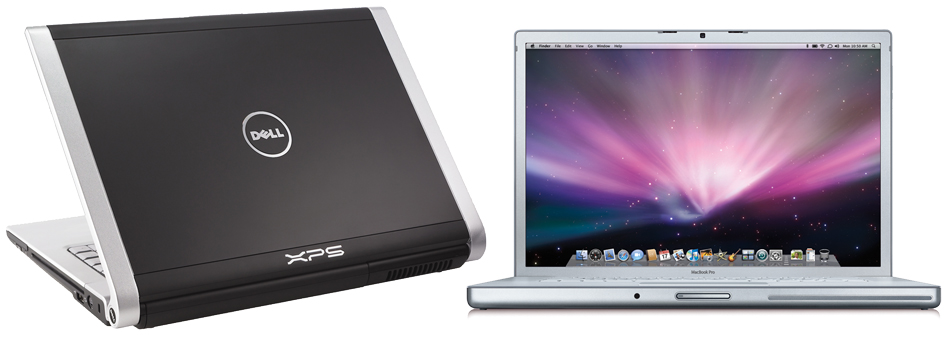
I was in the market to buy a new laptop earlier this year and I came down to comparing to machines: the Dell XPS M1530 and the Apple MacBook Pro. I compared both of them to every aspect I could possibly come up with. Anyways both machines recently have received some upgrades so I thought I should update both comparison lists for those of you who might be looking for a new 15-inch notebook.
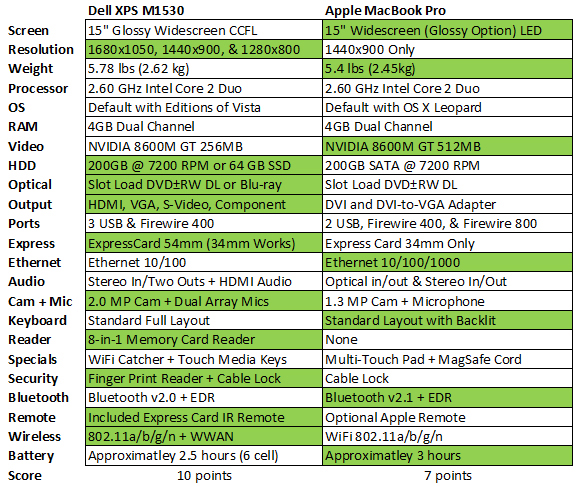
Update 4/20/08: Dell is now offering a 1440×900 LED and 1920×1080 Full HD displays.
I gave Apple a point for the Screen since they offer a non-glossy option which I truly prefer due to glare. Dell was expected to push out a LED screen over a month ago, however it hasn’t happened yet. The body of the MacBook Pro is cleaner, simpler, and lighter compared to the XPS 1530. In terms of Operating Systems, if you want OS X Leopard, chances are you won’t be able to get it working on a XPS; however it should a breeze to install Vista/XP on a MacBook Pro with Boot Camp. Leopard can use 4GB of RAM; however you’ll need 64-bit editions of Vista or XP to utilize all of it. Dell offers many more options for HDDs including a 64GB SSD which would be unusual for a 15-inch laptop. Dell also lets you turn your XPS into a Blu-ray player with an optional Blu-ray read/write drive which is great for watching high definition movies. I was irritated to find out that the XPS didn’t have gigabit Ethernet, which is great for transferring large files on a local network, especially when most new laptops have it. Apple won the keyboard war with its beautiful backlit keyboard with an ambient light sensor. However the XPS makes up with a Finger Print Sensor, which is great for bypassing typing passwords when people are around, and a better Web Camera. The XPS comes with a media remote control which tucks away into the express card slot while Apple now charges an additional $20 for their Front Row remote. The XPS M1530 can also be configured with a Sprint or Verizon mobile broadband card which will utilize the laptop’s antennas for better signal gain. I choose the 6-cell battery for the XPS since it was the best one which didn’t stick out. It offered only 2.5 hours of work time while the MacBook Pro gets about 3 hours.
If you didn’t already notice, there’s one major factor I left out on the chart: price. This part is what made me make my final decision which was to go with the Dell M1530. Dell offered a pretty good student discount in addition to their constant promotions. Apple also offers such discounts, but are incomparable to what Dell offers. With both configured to the highest similar specifications, the MacBook Pro was getting very close to $3000 while the Dell XPS was about $500 cheaper costing about $2500. In addition for those of you on a strict budget like I was, there’s more flexibility to remove unneeded components with the Dell to bring the price down. Anyways, that’s my two cents so please feel free to make comments.
Links: Apple MacBook Pro | Dell XPS M1530


You didn’t even put the os as one of the comparable’s mac osx the much better than windows and you can even run windows on a mac if you are on a budget than get a macbook non pro it very hard to compare windows and mac though
The dell 3USB/FireWire 400, Mac 2USB/FireWire 400 AND 800! winner dell? WTF!
How much does the SSD COST?
Blueray drive COST?
Video Chat on the Mac is far superior to the dell.
It’s the software stupid. In the end you get the combination of OS X with the Apple hardware. With the dell you get a dell and Vista. lol
have u guys even tried vista? i am using it now and it has worked with no biggie problems for a few months now. and plus it will all be fixed this month when the SP1 comes out.
to Rene,
i dont know what ur smokin but it i dont think either one won the point the ports. neither side is highlighted. and just to let u kno just abt all the devices ive ever used have been firewire 400, NO 800. also 2 USB ports for a 15inch stupid. even the 7-inch ASUS eee pc has got 3 usb ports. lol
also how is video chat different on either machines? is the hardware webcam we are talking about. you can use skype on both and get the same results. you cant get better video chat on a mac if it has a worse webcam. its not like it is using another camera for vieo. hahaha
and if i did get the blu-ray drive ($500), it would still be cheaper than getting a mac!!!
Sorry man but I think the MBP is the better deal of the two. Leapord is worth the extra $500.
Great comparison. My friend has a macbook but I think I’m going with the xps.
Does anyone know how much a standard packaged xps 1530 would cost?
You Mac guys are funny. Im not going to give away the vertues of the PC over the Mac. I will say; If you know what you are doing, in the right hands the PC “is” more powerful. The two machines in the review above are both so under-utilized by most people it’s a joke. Yea, I got my 200mph Corvette that I drive to work at 60.
I just puchase the Dell M1530 LOADED!!! BLue ray rewrite the only thing it doesent have is the 64gb ssd that costs like a 1000 more its to small for the price. But I have a mac book pro and this dell laptop blows it out the water, Im sorry but Vista doesent have many problems and also this laptop is way better than my macbook pro which does less and costs more WTF??? OSX is not worth it, Id rather have a much more powerful system, I am a die hare macbook fan but they really need to consider lowering there prices. Go price the systems yourself and youll be giving up a lot with the macbook pro
I am also thinking about these 2 machines. I think if XPS 1530 can run MAC OS 10.5, I buy XPS immedately. It is because the MAC OS upgrade is not free of charge for MAC user but it is free for PC user. Moreover, the price for XPS is just 2/3 of the MAC book Pro while I will use 4G ram. Futhermore, using Mac Book Pro running Windows that the nvidia driver is not running good. But I have to do C/C++/Objective C programming on MAC. So, if XPS can run MAC, I cannot find reason to buy MBP.
Jakesaturn, sorry bud I do not believe you own a mac at all or if you do, you really do not even attempt to use fully. Sorry but die hard fans wouldn’t even think of owning a PC and would be disgusted to be forced to use a PC at work. (I should know, my bro is a mild mac fanatic. I was a network admin with a fortune 500 company that is 100% windows. Even with corporate tools, Vista is still very “buggy” compared to XP. That said, I switched fields to go into medicine and bought a macbook to not have to worry about viruses and problems. Guess what, its been 2 years and I am not only happy about the switch but haven’t had the urge to upgrade like I did when I owned a PC. I still switch to PC to do low level network stuff but now I can learn linux commands with the mac. (BSD)
Hi Tabu, sorry about that I forget tell you my programming background. I work for UNIX system for many years, say IBM S390, SGI Onyx, SGI O2 and MAC for me is just another unix. You are corrected that I have not fully used the MAC while I just use it for develop CG program. Execpt the SDK, I almost just use the terminal. In fact, for PC, I also just know how to use IE and CMD. So, I may cannot feel how bug of the OS while I don’t use the UI so much.
Apple will never support users who install hacked version of their Mac OS X on their PC, hackintosh is not the answer, if something goes wrong, you can only rely on your forum friends to help you out. And you wont get the stability of Mac OS X on hackintosh PC.
FYI, SP1 doesnt improve much like what you guys hope so. and take note that by early next year, MSoft will stop producing XP, but the support will be there. Why? Cause Vista is such a crap that MSoft need to push people to Vista.
Bugs? Vista love bugs, if you like bugs too, go Vista!.
Edit: Oh yeah almost forgot to write, its true that you pay more for Mac which has less hardware compared to PC but because Vista sucks so bad, I will never consider it as my XP replacement until Windows Codenamed 10 appears. Its worth it to pay for a UNIX based OS, you spend less time fixing stuffs and increase your productivity.
I just picked up my XPS1530 from DHL yesterday:
Nvidia 256MB 8600GT
802.11a/b/g
T9300
3GB
200GB shock sensor hdd
DVD RW
1680×1050 LCD
bluetooth
Vista Premium
extra power supply
4yr onsite/complete care/lojack.
How much? $1660 plus tax…(healthcare worker discount)
Can I play games with a MBP? Why I even purchased a new laptop to replace my Precision M60…Neverwinter Nights 2 for example…
The XPS is a gaming system…and why I purchased it…
Why do you post the spec of your XPS1530? Everyone knows roughly its spec. By the way, you do can play game on the MBP, just install XP and you can run game 10fps faster then your Vista Ultimate/Home Premium. MBP is 802.11n so it has a better wireless card.
But since you are into gaming, then its okay, but if you dont do much gaming, definately go for the MBP. Dell marketed the XPS as a gaming system, see the XPS1330 and tell me if you can still play high end games on it.
let me correct the specs of teh XPS 1530. It doesn’t have a component video out, but it got a Gigabit NIC. I dint understand what’s this WWAN. I dont consider the fingerprint reader as a secuirty device. It is just an alternative for the Windows passwords.
And of course the Quality of the Mac Book Pro is far superior than the Dell XPS.
Edit: Let me add the wireless NC is 802.11A/G/N
I definitely agree with you, besides who will be so busy body to see you typing your password, unless you type soo slow that everybody can remember what’s your password is.
@ Manu
The XPS can easily do component. You can buy an adapter on Dell.com which plugs into the port that looks like the S-Video slot. This isn’t just any standard S-Video port, it is capable of outputting high def video content to a HDTV. Next, the WWAN (Wireless Wide Area Network) is a mobile broadband card that is embedded into your laptop. You can pay Verizon or Sprint for service and then you’ll hvae high speed wireless internet anywhere you go! Lots of business people who travel use this feature. The security device actually does have quite a few neat features. It encrypts and stores the fingerprints onto it’s own storage, so it wont be on the hard drive. In addition it allows encrypting files so that even if someone gets into your machine, they’ll need another fingerprint swipe to get access to certain files. Finally both the Macbook Pro and XPS M1530 support the same WiFi protocols! There’s no difference. Both can do 802.11 A B G N
Because when you order one, there can be great variance on components from one to the next, since you piecemeal it together when you order it.
Screen resolution, CPU (T9xxx, T8xxx, T7xxx, T5xxx), anywhere from 1GB to 4GB system memory, 128MB 8400GS/256MB 8600GT, ect…
Even 2 different 160GB hdd, one with free fall sensor, which is $75 more than the one without…
Also, prices are different whether you choose “XPS Laptops” or “Gaming Laptops”, even though they’re pretty much the same in the end.
It’s like buying a new car and everything is an option and not “prepackaged”
Maybe people here would know the difference, but many I know just see is price and screen size. They have no idea what’s inside, what it does, and how one thing is better than something else. Same with desktops.
Yeah, I agree with you, many people are not computer literate.
It used to be hard to compare Macs and PCs when Macs used Motorola, but now its essentially comparing hardware to hardware now that new Macs are intel-based. Its difficult to compare OS’s between the 2 but dollar for dollar you made the better choice as Apple is an evil monopoly and can get away with price fixing their machines.
Id say both options listed here are overpriced crap. Why? Because both use the NVIDA 8600 GT. Games? Are you kidding? That thing will be obsolete in less than a year. A good graphics card is more important than a super-fast cpu that moat people will never utilize, while the graphics card will usually be utilized to its max capacity. And graphics cards are used for more than just games… I bought a gateway P-6831FX for $1350 (compared to a $2000-$3000 macbook) that uses the newest 8800GTS card. It is BLAZING fast and more than triple as powerful as the 8600. You can even play Crysis at high settings (tough to do btw) and remember.. this is a sub $1500 laptop. The cpu may be 1.8 dual core, but it still beats the SHIT out of macbooks with obsolete graphics cards. Have fun wasting away your money on laptops that are already obsolete.
-Danny
Well since you said that Danny, then your message is more towards the Dell cause Mac never promote the MBP for games, it is meant for pro software apps which means 8600 is good enough. Besides, majority of the world dont play hard core or demanding games. Gateway is a cheap option for gamers who want a good laptop for gaming. MacBooks uses integrated GPU so as you see Apple never mean to let you play games on a Mac, they just give you that as an option and if games is your primary stuff, go for the buggy incompatible Vista.
Im not saying you are wrong or anything, but the MBP was never about games to begin with, about the Dell? Im not sure cuz the XPS line is meant for gaming (desktop line), not sure what it means for XPS Mobile (laptops)
[Combined Comments] Oh yeah, since I cant edit my post, let me add something up, if you say 8600 gets obselete, by the time the 9 series is released, your 8800 is obselete. Loser
So macbooks are not for games. They are not for business. They are for “pro software apps…” well i think that is a good point. as a film enthusiast i know that Final Cut simply can’t be beat. But don’t forget, that is an extra $1000. My point is the gateway laptop is much cheaper, and more well-rounded. Heck, it takes 4 screws to open up my ram, cpu, and hard drive in my gateway laptop, so replacing/upgrading these are a breeze. an upgraded cpu with an 8800 GTS should last at least 4 years and is still less than $2000. I guess it comes down to what you want your computer to do. Games and versatility with hardware with lower prices= gateway. If you want to get a mac simply to use mac-branded software, then by all means, buy one.
Yeah, sorry for the rudeness, but thats what Im trying to point out that if you are gamer, then to the all means get a Windows laptop (Gateway, Alienware). If games is not your priority and you are not willing to spend time fixing Vista bugs by all means get a Mac. Yeah, you can say Apple is evil for selling overpriced laptop but they have been doing that ever since they use IBM processor so what the heck.
Anyway, I was wondering, why would a hardcore gamer use a laptop? Ain’t hardcore gamer will use a PC instead. And most company (Dell, Apple, Acer, HP and etc) usually sell laptops for people who games are not their priority, if games are your priority look for DRM(desktop replacement models) laptop.
Anyway enjoy your gateway and sorry for the rudeness. (Got carried away sometimes)
Hmm, I wonder if the thing I wrote just now got posted
Just reading your comments, I feel that both Dan and John have valid points. Going with a laptop for TRUE gaming is probably not the best idea. I would say any average-sized laptop around the $1500 price point purchased today would be out dated within 2-3 years. It also depends what you are planning to do with your laptop. For example I had been using a Sony Vaio with a 16MB ATI Video Card for my primary computer for the past 5 years. It has done the job for just about everything I needed except gaming. The XPS M1530 is my new primary machine and I plan to use it for 3 years.
I felt that the Macbook Pro is too expensive for my needs. As one of you mentioned, it is great for video editing since it has Final Cut Pro. However anyone who plans to do any real hard core editing will probably use a Mac Pro Desktop. In addition you have the option to run Vista on a Mac, but not OS X on other machines. So you are paying for some exclusive features.
P.S. John, as stated in the notice below the “Submit Comment” button, sometimes comments are automatically held for moderation if something triggered the spam filters. So don’t worry, Skatter Tech doesn’t censor anything unless we have a real good reason to do so!