


 By
By 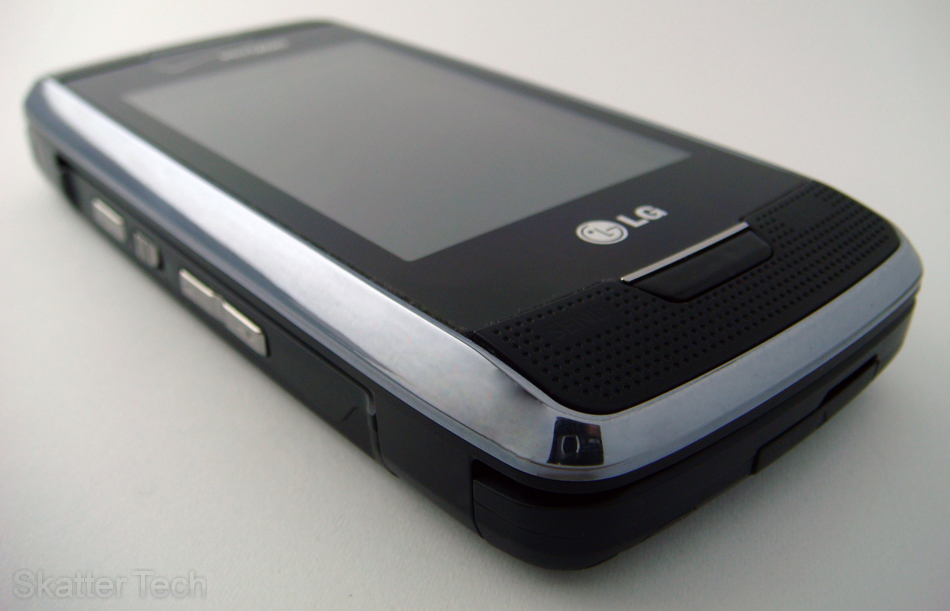
The phone everyone’s been waiting for is finally here. The LG Voyager, which is also known as the LG VX10000, is an upgrade to the popular LG enV (VX9900), which we reviewed around this time last year. Skatter Tech was lucky enough to get a hold of this unit, courtesy of Verizon Wireless, and I’ve been putting it to the test since I got it last week. Just for a quick overview, the Voyager features a touch-screen display plus an internal wide-screen, a full HTML browser, a QWERTY keyboard, Mobile TV, and a ton of other new features. Although LG seems to be taking their communicator series in a whole new direction, I would still say that Voyager is definitely a worthy upgrade to the enV.
LG VX10000 Specifications:
- Provider: Verizon Wireless (1.9GHz / 800MHz CMDA)
- Form Factor: Laptop-like w/ QWERTY keyboard
- Dimensions: 4.64H x 2.12W x 0.71D (inches)
- Battery Life: 240 mins talk time & 480 hours standby
- Screens: 480 x 240 pixel TFT external & internal
- Digital Camera: 2 megapixel camera and camcorder
- Storage: ~185MB internal + microSD (8GB max)
- Special: external touch screen and mobile tv
- Others: Bluetooth 1.2 + Stereo Speakerphone
- Price: $299 with a new 2-year contract
LG Voyager Body: – 5/5 stars
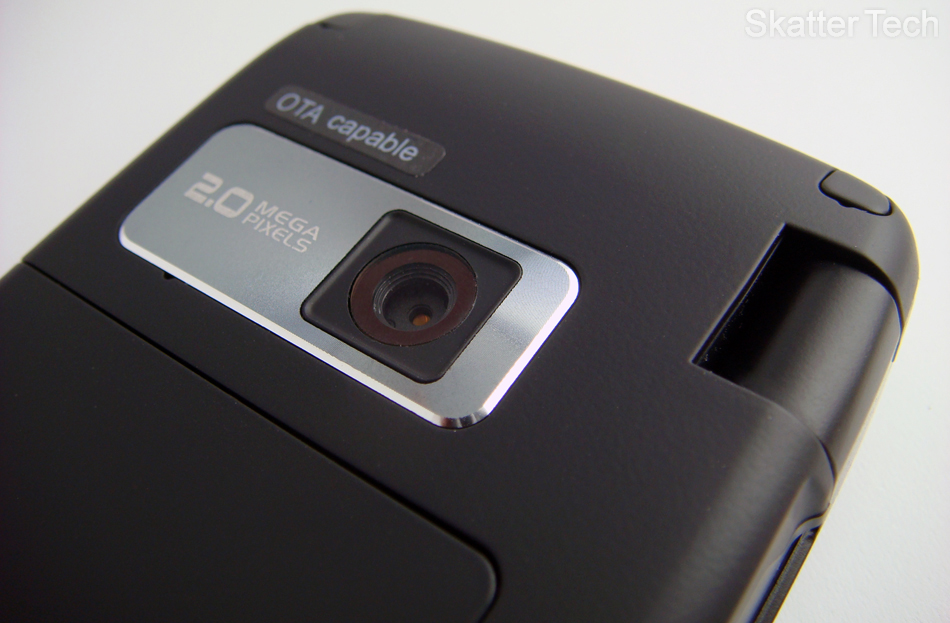
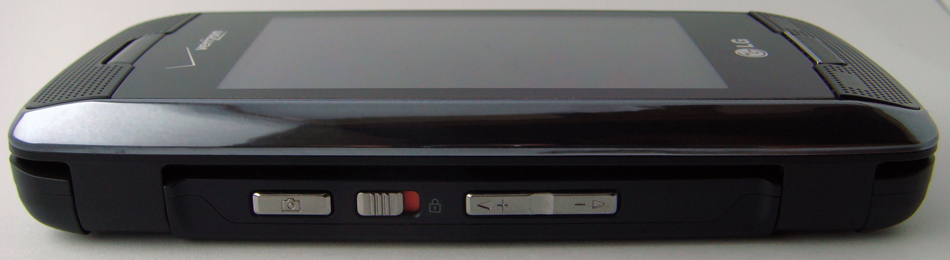
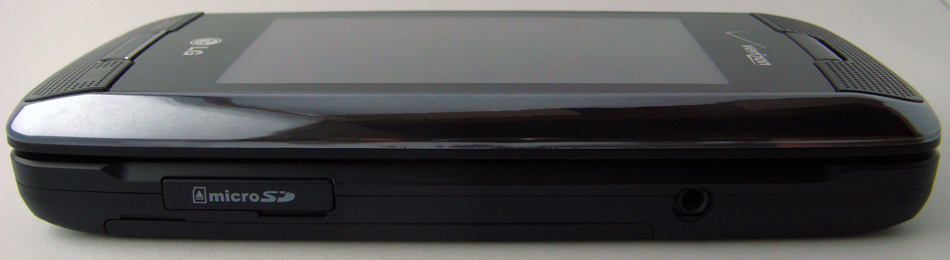
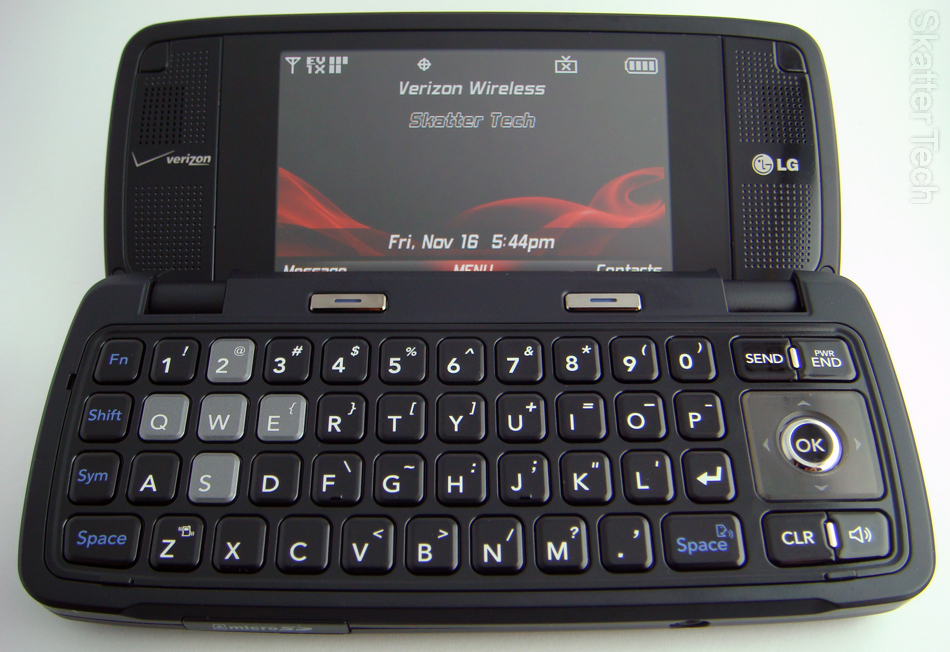
The VX10000 is a bit larger than your average phone, but no one should be complaining once they see what it has to offer. The phone stands 4.64-inches tall, is .71-inches thick, and 2.12-inches wide. The Voyager retains the same height as it’s processor, the enV, but is slightly wider and thinner as well. The phone should fit into most pockets, but might be a bit of a stretch for tight jeans. On the front of the phone, you’ll find the large touch screen display followed by the SEND, CLR, and END hard-keys lined up at the bottom. On the left of the phone, there’s a camera button, a spring-loaded hold key, and a toggle volume control. The microSD card expansion and the 2.5mm headset jack are the left side, while the charging port, which doubles as the USB connector, is on the bottom. You can charge your phone via USB as well! Other than that, there’s a two mega pixel Camera centered at the top on the back and a battery pack right below it. One the inside of the phone, there’s another display located between two speakers on the top portion and the illuminated QWERTY keyboard on the bottom. The keys are well spaced out are are large enough to type quickly, making it possibly the best keyboard I have seen on a phone to date. Also, unlike the enV, the Voyager actually sits flat on a surface, so no wobbling!
The Two Screens: – 5/5 stars
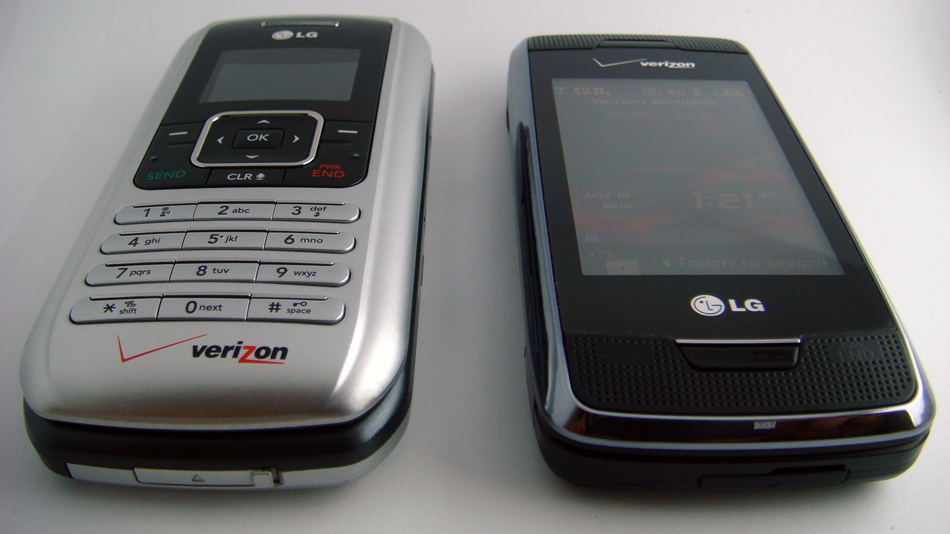
The biggest disappointment in the LG enV was the extremely small external display. All that has now changed since the LG Voyager’s 2.81-inch touch screen display takes over the entirety of the front and even replaces the numeric keypad. The phone’s internal display is also 2.81-inches diagonal, but isn’t a touch screen. Both the screens have a resolution of 400 by 240 pixels and a color depth of 262K. The quality of both displays were excellent. They were bright and clear enough to view in direct sunlight. The accuracy and responsiveness of the touch screen display was great, but some buttons and items were too small and hard to reach, so interface could use a bit of work.

Music Player: – 4/5 stars
I had a great experience with the Music Player on the enV and was hoping for a big upgrade, but it seems as though there hasn’t been any chances. The main complain would be that the interface for the player is completely different on the external and internal displays. The interface for the outside portion has been designed for use with the touch screen and works fairly well. It actually looks quite neat and allows browsing by Songs, Albums, Artists, or Genres. You’ll have the ability to purchase music from the mobile store, shuffle your music, and search your library. Unfortunately the same can’t be said for the internal interface. The music player on the internal display is still using the standard theme found on the enV and a plenty of other Verizon Wireless phones. In addition the developers have managed to make such as simple program actually look worse and just for starters it doesn’t even utilize the full display. Instead the program has been cropped to a 320 by 240 pixel frame with black borders. Despite this, the playback functions work quite smoothly and the player didn’t have any other major flaws. For supported formats, the Voyager can playback unprotected MP3, WMA, and AAC files in addition to songs purchased through the phone. (Will work with Amazon MP3 & iTunes Plus!) Overall the player is functional and even displays Album Artwork for a nice touch, but it could have been better.
Speakers & Headphones: – 3.5/5 stars
One reason I liked the enV and its predecessor the LG VX9800 (aka “The V”) was the fact that they all had built-in stereo speakers. The LG Voyager carries on that tradition, but there’s a problem. The speakers in the LG Voyager sounded quite horrible and began to crack terribly even before we got close to reaching full volume. (No bass as well.) I would have expected for an even better experience, but these speakers prove otherwise. Since the LG Voyager is also a music phone, I would have also expected them to implement a standard 3.5mm headset connector. Instead, the Voyager maintains a 2.5mm headset jack meaning that you’ll need to purchase an adapter for use with your regular headphones. As Bluetooth headsets are becoming so cheap and barely anyone uses wired headsets anymore, I wonder how long it will take for manufacturers to phase out 2.5mm jacks and replace them with 3.5mm ones. Fortunately, listening to music with headphones on the VX10000 was a much better experience than with the speakers, but quality was still no where as good as on the VX9900.
Digital Camera & Camcorder: – 3.5/5 stars
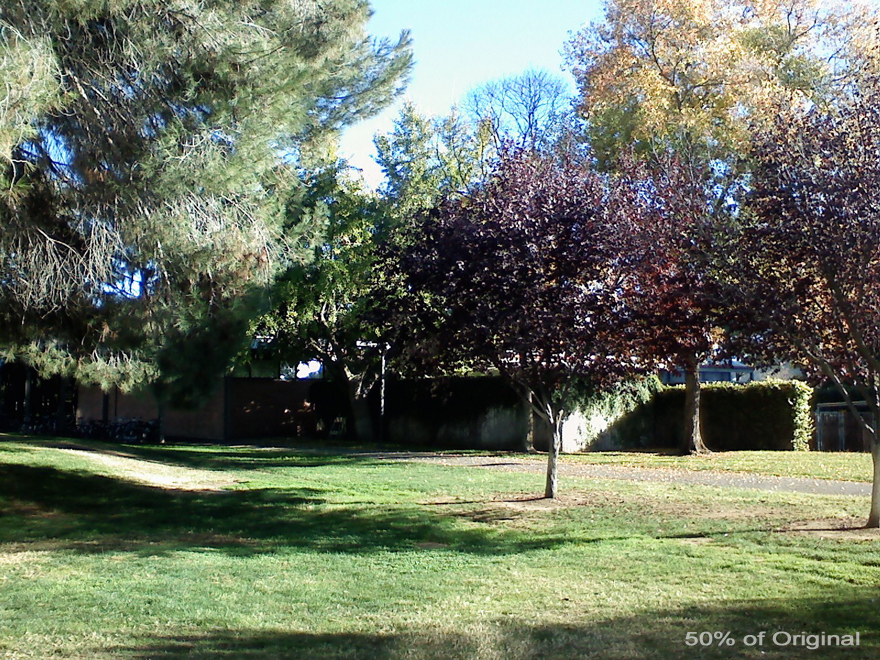
The LG Voyager features a 2.0 megapixel camera, which also functions as a camcorder. Photos can be taken at a maximum resolution of 1600 by 1200 pixels, while videos can be recorded at a max of 320 by 240 pixels. No improvement for either of those functions have been made since, as those were also the maximums on the enV. The camera and camcorder allow setting the white balance and choosing color effects for captured content. The external display can be used to take self portraits when the phone is flipped open. The camcorder can record up to 1-hour videos, however only clips under 30-seconds can be emailed. On the other hand, images of any size can be emailed. The camera also has an auto focus function, which drastically improves the quality of your photos. The part that was quite disappointing was the fact that LG has removed the retractable cover, which protected the lens, and the built in flash, which was quite handy in low-lighted situations. Overall, the image quality seems to have actually degraded.
microSD + Syncing: – 4.5/5 stars
LG has taken a big jump with microSD technology, now supporting 8GB cards. That’s a fairly good increase considering that the enV was limited to 2GB microSD cards. Although 8GB cards might be a bit pricey at this point, you should be able to purchase a 4GB microSD card online for under $40. As for syncing music, it was as simple as it could get. Your computer will recognize the Voyager as portable media player (mass storage device), so no additional drivers were required. You will, however, need to pop in the CD and install the drivers if you do wish to use your phone as a data modem. Once the device was recognized I was able to use Windows Media Player to transfer the music onto the Voyager. If you prefer to directly copy files onto the phone using the file explorer, that works smoothly as well. Mac OS X users, unfortunately, will have to use an SD card adapter to copy their music onto the microSD card since USB drivers are not yet available. Even Windows users will also end up having use a SD card reader/write occasionally, since it isn’t possible to access your photos and videos when using USB.
Bluetooth: – 4/5 stars
There hasn’t been exactly too much improvement with Bluetooth technology either. The LG Voyager continues to use Bluetooth v1.2, which the enV already had. Most new phones including the LG Muziq, which we reviewed a few months ago, and the Apple iPhone now boast a Bluetooth v2.0 platform with Enhanced Data Rate. Despite this, the LG Voyager was still able to work perfectly with my Samsung WEP200 headset, which uses Bluetooth v2.0. The VX10000 also supports using Bluetooth for use as a dial-up modem, with wireless stereo headsets, for transfering phonebook/calendar entries, and sending images to your computer. So it should still be able to do just about everything important.
HTML Browser: – 5/5 stars
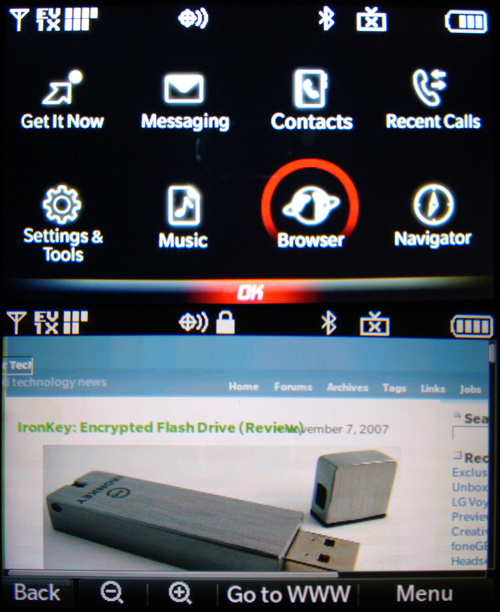
First off, let me say that this is in no way comparable to the Safari browser on the iPhone and iPod Touch, which is amazing. This is, however, a HUGE improvement over the standard BREW browser found on most Verizon Wireless phones, which could only handle WAP pages. The browser is simple, easy-to-use, and works with both the external touch screen and the internal display. Even large web pages (ex. digg.com) loaded eventually, but using it was not practical since it took too long to load or navigate. The browser doesn’t support flash or ajax, but was sufficient enough for viewing text, images, and links. Most of the websites we tested it with worked surprisingly well. When using the external display you’ll be able to drag the page around with a finger, otherwise you’ll have to use the four-way navigation pad. Additional “screen optimized” and “text only” views are available along with the zoom function. The Voyager also delivers the web content over a 3G network which is faster than the iPhone’s 2G.
The Interface: 4.5/5 stars
The LG Voyager external interface is probably the most attractive interface I’ve seen on a phone from Verizon. To use the screen, you’ll have unlock it first by either clicking on the un-lock key on the screen or by pressing the hold key on the left spine. At the bottom there are four quick access buttons: Messages, Dial Pad, Menu, and Phone book. Clicking anywhere else on the screen will bring up a shortcut menu with even more icons to different apps. Just about all the phone’s features including the music player, navigator, web browser, V Cast Videos, camera, and text messaging is use able through the external screen. There are some applications including Mobile Email and Get It Now programs that can’t be used through the external display, so you’ll have flip open the phone. Another neat hardware feature implemented into the Voyager is tactile feedback. When something on the touch screen is clicked, the phone emits a vibrating impulse indicating that an action has been detected. The internal interface has received a clean makeover, but will remain very familiar to enV owners. The enV’s “Email Key” has now been replaced another shortcut menu, offering easy access to plenty of functions. Although the interface wasn’t perfect, it looks good, was usable, and was quite impressive.
GPS Navigator: – 5/5 stars
One feature I did truly did enjoy was the built-in GPS Navigator. The program, which costs $9.99 per month, gives subscribers access to maps, turn-by-turn directions, and local searches. The part that I like the most was that the voice narration actually read out street and highway names instead of simply stating “Turn left ahead” or “Make a right turn”. For example, actually reads out “Turn left onto Saratoga-Sunnyvale Road,” “Exit freeway on the right for San Francisco,” and “Keep right on Mission Blvd.” Most navigators I’ve used including those built into Lexus/BMW cars and portable Garmin/Magellan, couldn’t do this. The one’s I’m talking about were over an year old, so I’m sure new ones can read out names and do much more. Purchasing a decent navigator can cost a few hundred dollars, so spending $120 for a year of subscription isn’t too bad. In addition, if you don’t want subscribe and don’t use your navigator that often, you can pay a one-time fee of $2.99 for 24-hour access. Overall navigation tool was well polished, worked on both screens, and will come in handy if you’re ever lost.
Messaging: – 5/5 stars
In addition to text, picture, and video messaging, the VX10000 also has an easy-to-use email client which will work instantly with your Yahoo! Mail, Live Mail, AOL/AIM, or Verizon accounts. If you do happen to have your own server or use another mail service such as Gmail, you can even enter in your own POP3/IMAP and SMTP servers. The only downside was that the functionality was quite basic and didn’t even allow opening links in messages. Despite this, it remains a good way of getting a sneak peak of your inbox, replying to messages, and composing new ones when you’re away from your computer. The phone also has a built in Instant Messaging client which will work with AOL, Windows Live, and Yahoo! protocols. The program runs smoothly on both screens, allows viewing your buddy lists, and participating in multiple conversations at once. Both the Mobile Email and Mobile IM clients have the ability to run in the background and display notifications when new content reaches your phone.
Other Goodies: – 5/5 stars
The LG VX1000 comes with a bunch of extra tools including a calculator, calendar/date-book, alarm clocks (3), stopwatch, world clock, notepad, tip calculator, and a voice recorder (1 hour max). The address book can hold one thousand entries with five numbers and two emails per contact. Unique ringtones and photos can be set for each contact as well. The voice dialing feature allows making calls by reading out names in your address book or dictating numbers to dial. The final extra feature we’d like to touch on is Mobile TV. We would have reviewed this feature, but there was one problem. What’s the problem? There was no coverage in our area. The service only works in three cities in California and a total of 25 cities through the entire United States.
Despite my minute complains over speaker/headphones quality, the music player, and camera, the LG VX10000 is still probably the best phone offered by Verizon Wireless. In my opinion this will be a big seller for the holiday season and will probably be difficult to get a hold of. I strongly recommend this phone if you plan to actually use the features it offers, otherwise going with a more compact phone will suffice. Verizon Wireless has even been kind enough to throw in a USB cable so you don’t have to purchase a Music Essentials Kit to sync your music. If you plan to purchase this phone it will be available online and in stores on November 21st, 2007. You should also be able to pre-order the phone by calling Verizon Wireless or visiting their website. The LG Voyager will run you nearly $299 after signing a new 2-year contract and submitting a $50 mail-in-rebate. If you are eligible for upgrade, you should be able to get another $50 or $100 kicked off price based on your current calling plan. Overall the phone will take a bit getting used and even though it’s a bit on the pricey end, you are bound to enjoy what it has to offer.
Deal Alert: LG Voyager for $199! (with new 2-year contract)
Links: Verizon Wireless | Voyager Data Sheet (.pdf)
Related: LG enV VX9900 Review | Voyager Video Walkthrough


I am ready to order the Voyager, was going to go for the Iphone, but then the Voyager appeared. My Verizon contract is up in 2 months, so I can get the $100 off which makes a difference. It just seems like it’s very involved and the monthly bill is going to be up there. Feedback??
you will be able to get a $40 plan which is just 450mins talk and no text/browser stuff. If you want that type of stuff you’ll have to pay around $65 which give you the mobile tv, text messaging, web browser, mobile email, and a whole lot more. At least you have the choice of choosing what you want and don’t want. my friends with iphone’s are going broke since they have to pay $60 a month plus tax and stuff. they can’t go to cancel it as well too becuase then there’s a closing fee. (very expensive)
Im on Verizon and no way an ATnT fan but they just created a cheaper plan for the iPhone… u have to go on ur account and get rid of the internet feature, it doesnt require any changes or charges to ur account.
I had the Iphone…good phone at best but went back to Verizon because of BAD BAD BAD service, dropped call and slow internet with Iphone at&t. Bought the Voyager and so far way better over all!!! Still in the learning curve but Verizon is way better than att in my area. Funny thing is 90% (minus phone) of th iphone still works IE wifi ipod widgets etc…
My Voyager worked great for about 18 hours. All of a sudden, the screen shows only the Verizon logo, does not boot up even after removing and reinstalling the battery, and won’t power off unless I remove the battery. I called Verizon, and after hearing the representative say, “That’s so strange” about 15 times, they, of course, told me they are sold out, and I have to wait several weeks for a replacement. I hope this is not the start of a bad experience.
I have the same issue. Did you every find out how to resolve this on the vx10000s? thx.
Scott-I just ordered one last night on-line & will have it by Tues
I have had my Voyager for about 5 days. It has worked great, even in rural Virginia. I did break the charger already by tripping on the cord and ripping it out of the wall, but I just charge it with the USB now until I can get down to a store to replace it. Good thing I got the total equipment coverage. Does any know any tools or tricks for transferring videos, files, etc to the phone without just using the card? Such as transferring to the internal memory? I would like to setup my mp3s as my ringtones too.
Have had mine since 11/21 and I am still learning what it can do. Takes a bit of learning on how to scroll using the touch screen. Transferred some music, took awhile for VISTA to find the phone. Tried following directions after installing VCast Music manger but got better results doing it my way. Sound when closed is poor for ringtones. Ringtones are really bad, you would think they would give you some really nice ones for this phone but I guess they want you to pay for the better ones. Music sounds fairly good, much better when using ear buds. Anyone know how use a song from the playlist on the phone and make it a ringtone, easily? May be in the phone but I cannot find it yet…..lots of stuff. Plastic holder is really bad; phone opens on its own, needs to be in a case type holder. Calls have been great no drops. Have the VCast pak for $15, no TV in my area, but we do have REV A. Great phone so far, may even keep it.
I ordered the Voyager online & won’t get til Tues. Since I already have Verizon service, I guess that I will haveto take my phone into one of the stores to have my numbers transferred. Otherwise, would have to do myself manually. Anyone know, if I have to go to the store for the number transfer??
Mary – you can activate your new phone online from the verizon ‘My Account’ page. You dont have to go to the store to do it.
thanks Mike, so I can activate & @ the same time transfer all my names/numbers?? if so, that would be great~
@Sean
The best solution would be BitPim (www.bitpim.org), it was one of the best tools for the LG VX9900. Unfortunately it doesn’t support the LG VX10000 at this time, but they are bound to add support very soon. It should allow transferring contacts, notes, photos, videos, ringtones, and much more!
@Curt
Using your MP3s as ringtones are usually locked by Verizon. They want you to buy ringtones from them instead. To use your own files, use BitPim, which I mentioned in my comment to Sean.
@Mary
You’ve got a few ways of restoring your numbers, going to the store isn’t the only option. If your old phone has bluetooth and supports contact transfer, you can send all those numbers over to Voyager. The second option is to use the Backup Assistant application. It is free, if you use the “My Account” option online to manage your account and pay bills. First backup your contacts on your old phone then activate the Voyager and restore all the contacts! Hope that helps!
This is very helpful reading all these tips. thank you. does anyboby know the monthly fee of the internet on the voyager? and can you buy all the Vcast, online, navigation, email, etc. individually? or is it all one big package?
I am getting the voyager in the next few days. I just ordered it from Verizon! After days of arguing they are finally letting me upgrade to the Voyager from the enV. Can any of you who currently have the Voyager tell me if you can save a sound from a picture message as a ringtone like you can on the enV? On the enV once you received the picture message that had the sound clip in it you could press “options” and then select “save as ringtone” or “save sound as ringtone” (I forget the exact verbiage)and once you did that it would show up as one of your available ringtones. It would be a huge help if you could tell me this. Thanks so much!
Rich
i just got the voyager and im trying to put some pics on it, i have vista and i put the cd in and go to install the modem and i keep getting a error,it says an installation support file c:\users\tom\appdata\local\temp\c3abe126-2bb2-4246-bfe1-6797679b3579}\isrt.dll access is denied… i have no idea wat that means or how to fix it. does anyone have a idea?
any help with the scrolling thru the contacts? it seems so hard to control, spins quickly & after you enter the beginning alphabet @ top, the only way to get thru the list is to scroll, not able to put second/third letter etc
i just push in and scroll my finger down and it goes thru all of them
@mary and @tom
The best you can do to narrow down to a contact on the external screen is to keep pressing the group of letters until you find the starting letter of your contact’s name. After that you’ll have to scroll your way through. Fortunately on the internal screen, you can just type a name on the keyboard. I have found voice dialing to work extremely well (for me), so that’s eliminated part of the problem.
I am already a Verizon Wireless customer and currently have the sch-a990, I want to upgrade but my 2 year is not avail. until March, is there a way to get the phone at the “new 2year agreement price” w/o having to pay the retail price? I know Rich you said you had to argue with them to upgrade your envy, waht else can be done? Can’t Verizon just sell you the phone w/o all the hassle of a plan and all that? What if I wanted to just buy it as a gift?
Verizon’s new every two is not actually every two years. It’s every 22 months. I heard from one of their customer service reps that they recently changed the policy so that you can upgrade after only 18 months. You may have to argue a bit. I definitely have my best luck, when I have a dispute, with dialing 611. They are very closely monitored while the branches do their own little thing. Most of the managers in the stores are useless and just plain don’t want to help you. It actually took me 3 days and many phone calls to get them to let me upgrade to this phone. I would say that someone had mentioned that customers were able to get their new every two credit after 18 months and that Verizon had just recently changed their policy and go from there.
I just tried bitpim and it does work with the Voyager.
curious what is bitpim?
it lets you add your own ring tones among a bunch of other things…
Actually now that you mention it I heard something like that to but put it aside given Verizonwireless does not have the best customer service reps. Thanks for the input I’m going to call today. This was so much easier when I worked for Verizon Core and could get the phone business to business, man guess I should’ve stayed! Anyway thanks again.
hi im kristin andyou all have problemes specially the guy that said he put his finger through all of the. and the guy who put the thing about a hbig package