


Word 07 Supports WordPress 31
For those WordPress users that already do not know, Microsoft’s new Word 2007 now supports publishing posts to blogs powered by services such as WordPress, TypePad, Blogger, and Live Spaces. It doesn’t exactly support every feature most blogging admin panels include, but is still a decent editor. I recommend using it to write out the text, spell check, and save the post as a draft. Then, once complete, login to your admin panel to format everything and finally publish.
If own Word 2007 and don’t plan to use it to blog, I recommend trying it since it’s extremely easy to setup. Just follow this tutorial and you should be able to start publishing articles within 2-3 minutes.
(Note: Tutorial is specific to WordPress. Click on thumbnails for larger pics)
MS Word 2007 Setup Procedure:
1) Open a Microsoft Word Document
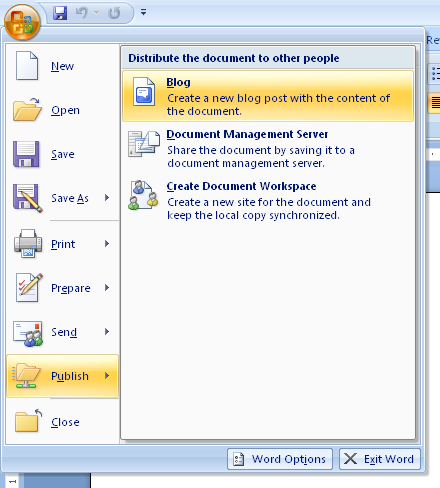
2) Hit the new Office Button Then select Publish -> Blog
3) If prompted to register, select “Register Now”
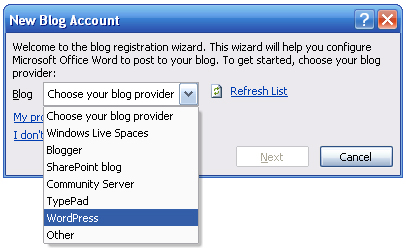
4) Choose WordPress from the dropdown and hit “Next”
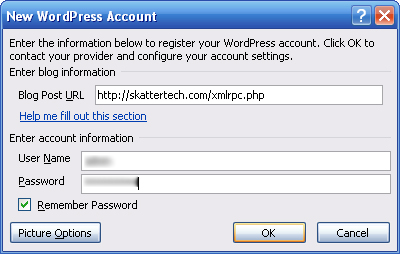
5) Enter your exact WP blog URL followed by “/xmlrpc.php”
6) Then enter your WP username and password and press OK
Once complete, you should receive a “Account registration successful.” in a few seconds. You may now enter a Post Title, Insert Categories you have previously created and write your article. When ready you may either directly publish it or save it as a draft for later from the dropdown. Word 07 also allows editing recent documents you have published by using the “Open Existing” button. If you need any help or having problems, you are welcome to ask questions in the comments.
Links: WordPress | Microsoft Word
tags: 2007, microsoft, office, vista, windows, word, wordpress, xp
31 comments.
Write a Comment.
Web Reactions:
Random
Recent
- Video: Install Chrome OS In VirtualBox
- Google Announces Chromium OS
- IronKey S200 (Review)
- Photos: HTC Droid Eris vs. HTC Hero
- Das Keyboard Model S Professional
- Top 5 MP3 Downloads Of The Week
- Samsung Reclaim M560 – Sprint (Review)
- iPhone App: Delivery Status Touch
- Are Netbooks With Contracts Worth It?
- Skatter Tech Gets Facebook Connect
Categories
- Accessories
- Autos
- Business
- Deals
- Entertainment
- Gaming
- Hacking
- Hardware
- Internet
- Mobile
- News
- Opinion
- Podcasts
- Reviews
- Site News
- Software
- Tips & Tweaks
Sponsors
- cheap website hosting from 2MHost.com
- Toners and inks with pleasant additions


thanks! this was really helpful, and it certainly is a breeze to use.
That’s a great how-to! I wonder how Wood 2007 handles the XLM data – when published, is there all of that extra data that there was in 2003?
Two questions:
Does Word still add all those extra formatting characters that mess up quotes? They usually show up if i try to restore a database.
When I publish a draft, word adds paragraph tags. Is there a way to set it up so it just sends text?
Otherwise, nice find!
At first it was a bit annoying to have to take out all the special style formating that Word had added to the post I had saved as daft for testing. But then I solved that problem by selecting all the body text and selecting clear all formating from the styles menu. Once complete post it to WordPress and it will only send the raw text. There might still be a few things you’ll need to fix up, so login to fix that.
Thanks man. Nice and easy. :)
When I do “Open Existing” against a blog entry it doesn’t pull up anything below the tag :(
Any ideas how to get around that?
Edit: sorry about my previous post….it should say the MORE tag.
creo que lo deberian de pasar en español
por favor!!! si alguien LO TIENE POR FAVOR envienmelo a corillo_dezu@yahoo.com
[Comment ID #22054 Will Be Quoted Here]
Una traducción de Española aquí:
http://www.neverlandteam.net
This is good to know that it works well, but I am not going to use word 2007 until I can get it for free, or until I buy my next computer.
Nice Site!
That’s a great feature… I’m getting rather tired of typing my entries in Word (2003), then copying the into notepad to remove the formatting, then copying them from there into Wordpress. I won’t be upgrading straight away though, so I might try your ‘clear all formatting’ suggestion from the comment above,
this was really helpful, and clear !
This was amazingly helpful, and a feature I never even knew was there until seeing your article. I even find Word’s posting feature easier than Adobe Contribute.
I can’t get my wordpress categories imported into word. Any thoughts?
Thanks for the easy to follow instructions. It really did help. Between you and videoprofessor [link removed], this old dinosaur is finally getting the hang of using available technology.
Thanks again.
When I tried publishing a HTML file opened in word, It crashed with a error report. Is that a limitation that We can publish only plain text?
BTW, this post was really useful
Its a nice post about online shopping because Online shopping is fast becoming the most preferred mode of shopping whereby shoppers can reap the advantages of
Internet shopping from the luxury of their homes.
Mine’s not working, at all! The product key doesn’t work..
Does anybody know the problem?
I hate it, and i can’t do my homework in time!
We can get this to work but what about putting an image in a document and getting that to upload to the correct place, can.t seem to manage this?
wheres your advantages of ms word 07
I use both wp categories and wp tags when I write a blog post. I word I only see how to insert categories… do you know if there’s a way to insert tags as well or do I have to log in on my account and do that after publishing?
i needed this for the xmlrpc part to display the MS word content properly without stripping out the underlying html tags
sorry forgot link
http://wordpress.org/extend/plugins/libxml2-fix/
how to write the tags?? do you know how to do that?
and is it works for self hosted wp?? please reply me..
Hey:) i have been poring over the site for a bit – Finally needed to say hi to everyone.
Thanks! This was very helpful!
Nice tut for Word… I didn’t realize it until I founded this blog…. nice one…
It never works. Microsoft Word like typical Microsoft products (and upcoming Windows 7) always crash as soon as you click Publish.
Hey, i tried a lot adding my blog provider to MS word
It always ends up with an error “word cannot register you account”
i am trying to add a blog (self hosted) and its also under a subdomain (quiz.waver.co.in)
any ideas
Are you sure you have that feature enabled on the WordPress Settings panel.
Oh Thanks a lot, I never gave a thought about it !
:)