


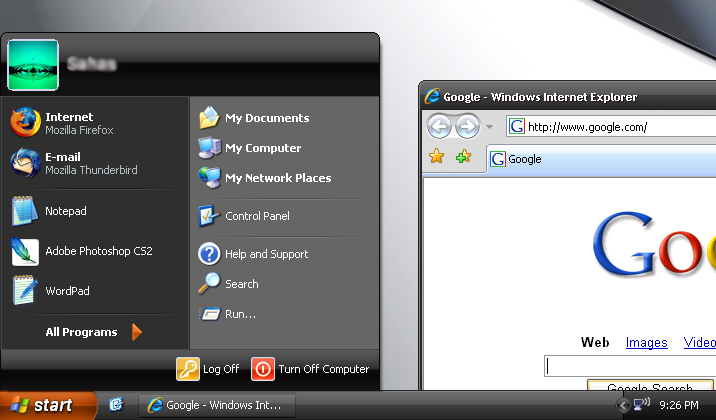
Windows XP – Zune Theme 60
Are you a sick of the current Windows XP theme? Well you are in luck. Microsoft has released a second theme package for WinXP called the “Zune Theme”, which was created to help promote their iPod-like mp3 player, the Zune. Other than for the background, which can obviously be changed, there is no hidden Zune advertising embedded anywhere. The theme is simply a modification of the Royale Theme, which we mentioned earlier this year, except that it is a glossy black theme instead of blue.
Installation is quite simple. Just run the “.msi” installation file and once complete right-click on your anywhere desktop and select properties. Choose the “Appearance” tab and under “Windows and Buttons” select the new style. Hit apply and wait a few seconds for the theme to load.
(P.S. Click image at the top to get a larger view of the new Zune Theme in action)
Download: ZuneDesktopTheme.msi
Related: Royale Theme For Windows XP
60 Comments
Write A Comment
Web Reactions:
Leave A Comment
Random
Recent
- SlingBox Solo + iPhone SlingPlayer (Review)
- HD Radio (Review) + Insignia Portable Player
- Skullcandy SK Pro Headphones (Review)
- Microsoft Arc Mouse (Review)
- Super Street Fighter IV (Preview)
- Lenovo IdeaPad S10-2 Netbook (Review)
- Sonic the Hedgehog 4
- Palm Pre Plus – Verizon Wireless (Review)
- Apple Announces The iPad
- RIM BlackBerry Curve 8530 (Review)
Categories
- Accessories
- Audio
- Autos
- Business
- Deals
- Entertainment
- Gaming
- Hacking
- Hardware
- Internet
- Mobile
- News
- Opinion
- Podcasts
- Reviews
- Site News
- Software
- Tips & Tweaks
Sponsors
- cheap website hosting from 2MHost.com
- Toners and inks with pleasant additions
- web design company
- Cell Phones from Wirefly
- Advertise Here $40/month


Hey just wanted to let you guys know there is a bug in the theme. The “Related Tasks” and such features in the left-hand column when viewing My Computer, My Docs, etc. doesn’t have new theme applied to it. To fix it do the following:
Go to C:\WINDOWS\Resources\Themes\Zune\
1) Create new folder “Shell”
2) Open “Shell” Folder
3) Create new folder “NormalColor”
4) Move shellstyle.dll from “Zune” to “NormalColor” folder
Should look like: C:\WINDOWS\Resources\Themes\Zune\Shell\NormalColor\shellstyle.dll
I hope Microsoft releases a patch to fix this!
@ Johnny
Zune.net has already replaced the download file with a working one. So moving the files is no longer necessary. If you already have the theme installed, uninstall, re-download, and install it again.
This theme is magnificient, hats off to all of the contributors. This is amazing.
when i click start, its not black like in the picture. Why is that?
For users who like the vista look but rather wait for Service Pack 1, this is it. Nice job.
Wow. Just patch your uxtheme.dll and you can choose from tens of thousands of Windows XP themes, or you could use Windowblinds, but that has high memory usage. If you want the full vista look in XP, Windowblinds can do it, even the transparency. The zune theme is way too microsofty for me, i use a nice apple theme and rocketdock for a full apple look :)
Google anything you dont know where to find. Deviantart is a excellent place for quality themes, and skins for everything else.
thanks. this is cool!
coooooooollllllllllllllll :)
thx thx it;s sik ass but 1 question does MCE and Vista look the same??
[Comment ID #16022 Will Be Quoted Here]
Nope completely different. Vista uses a completely new technology called “Aero” which currently will not work on WinXP machines. It pretty much makes all you windows partially transparent so you can see through the edges of them. Demo: http://microsoft.com/vista
Love it!!!!!
ang ganda ng theme ok at wala nman syang bug. thanks to u guys
one word…awesome :D
This is free to download… right? Just curious! :)
[Comment ID #22502 Will Be Quoted Here]
Yes, it’s 100% Free. No Spyware/Adware etc. It was created by Microsoft and they are offering for FREE to promote the Zune!
I can’t install it, and I don’t wanna take the chances of messing my computer up by replacing system files. I’m actually kinda scared to tread in the Windows XP System Files… :p But is there any other way to install it successfully other than replacing the system file?
@Super_Sonic
This was created my Microsoft themselves for WinXP. It is SAFE. You do not need to mess with any system files. Just download the file and go through the quick installation process. There is nothing you need to be worried about. If you have it already installed and it isn’t working, uninstall it from the Control Panel and re-download and install it.
Awesome!!
good
Message says “This installation Package cannot be opened. Contact the application vendor & verify that this is a valid Windows Installer package.”
What should I do?
@Simba
No clue, I have never seen that happen. Are you using Windows XP? If you are using Windows 2000 or something else that’s probably the issue.
tnx for this cool theme, but i dont need to do the one some1 told me to move files, it works anyway
This doesn’t work for me, it says “Supported operating systems are: Windows XP Service Pack 2 or greater.” Then I click OK and it closes the set up.
[Comment ID #26584 Will Be Quoted Here]
Just a wild guess, but I’m thinking you do not have Windows XP Service Pack 2 or higher.
I keep trying to download it (SP2) :l doesn’t work.
This theme is good, i do not like windowblinds nor style xp theme managers, it will ruin some of windows system files. BUT THIS ZUNE AND ROYALE THEME ARE DESIGNED FOR WINDOWS XP, I HAVE CHECK THESE 2 THEMES CODES AND THEY ARE OK.
Thank you! i’ve been looking for such a black theme without windowblinds and styleXP, for a while.
o sweet this theme is cool as
thanks !!!
Thnx… Royale Theme XP a.k.a Windows XP Media Center Theme..
Man this theme rox ass… Big UP to the coders :)
this is best thing ever, I downloaded once from an other website, and once I installed and restarted my computer my computer didnt turn on, so I got my second computer and I installed from this website and everything works great PRAISE THE LORD
A black theme should be white (or bright) text on a BLACK background. I hate screaming bright backgrounds – painful on my eyes.
what do i use to open the zune theme? because when i just try to run the setup thing, it says that the files are currupt and that i should redownload. any help or sugjestions?
mind blowing!!!
WOW Excellant theme I love the black and orange….. and the blue media is nice too!!!!!!!!!!
TANKS :)
f a n t a s t i c
It is possible to get the Zune theme working without service pack 2. If you extract the contents of the msi file using the admin switch on the command line.
start /wait msiexec /a C:\ZuneDesktopTheme.msi TARGETDIR=”C:\Zune” /qn
Then copy the contents of C:\Zune\Resources\Themes into C:\Windows\Resources\Themes and then you can select it within your desktop appearance settings.
I’ve noticed a problem with the theme – when selecting files in right pane of Windows Explorer, the selected item background color is navy blue (x’000080′) – not the gray it should be (x’BEBEBE’); when the mouse is moved, the item background is the proper gray. With the dark background and the default selected item font color (black), you cannot read the file names when selecting. My temp fix: set font color to white.
Anyone else have this problem? Any fix available?
i have windows vista theam but with xp and all i did was downloded it of http://www.softpider.com (far better)
Looks amazing, thanks!
to bad it doesnt work for x64 xp
Too Good Man. But how about a little perlish finish?? That would make it more awesom
Unfortunately I’m the first user. Hope this theme does not crash my system
AYE IT DOESNT WORK D:
im so pised D:
cos cos all of them wont work on my computer
and now the toolbars and stuff are ugly
classic style >.>
nice theme…but why not like vista style??
PLEASE GIVE ME LATEST MINDBLOWING THEMES OF VISTA FOR XP
I tried to download this twice and, a) it came out as zune theme and b) it didn’t show up. How dare you F*** my computer!!!!!!!!!!!!!!
This isn’t the official “Black Royale Theme” this is the Zune Theme :P. The official Black Royale theme is called Royale Noir, although it has to be said it isn’t what you’d call finished – but the design is very much similar to this one – Also, if you want a Vista style package for XP search for BricoPack thats really good, I have it patches quite well a few minor bugs, but with most additional XP themes the same bugs seem to occur so its nothing unusual…
hi there… please try my pack… include all 4 official themes by microsoft:
royale, royale noir, zune & embedded
http://www.megaupload.com/?d=3F1WKJHS
it’s a rar sfx (executable) if you like it please distribute.
sorry about my english, greeting from chile
fantastic theme
Man, this is awesome. THANKS!!!!!!!!!!!!!!!!!!!!!!!!
bedankt heur,
groetjes van ralph
It’s a breath of fresh air
Wow now I wonder if their are any other better themes…
wo.! I Love Black.
Thanks for your theme.
This is a really good theme just that the start button is very light being orange…
this is very nice theme and i search it
THANK U VERY MUCH…. this is the first time everI have changed my XP theme loL… love it.
One luv from New Zealand.
are there any other colors other than black ?