


 By
By 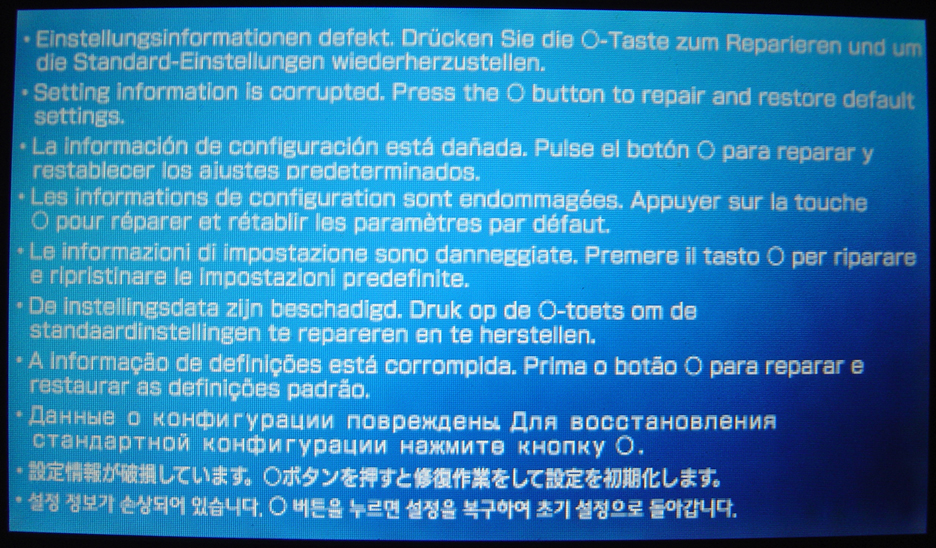
Many of you may have come across an article about six months ago (on sites such as [tag]digg[/tag]), which showed a crashed PSP with a blue screen. The image that was showed back then was actually a result of what would occur if your PSP were to crash when running a homebrew application. But the image seen above is actually a real Blue Screen that is a part of Sony’s PSP. From my experience I had never seen this screen before, but only appeared on my PSP with Firmware v2.60 when a game froze. The error message popped up when I accidentally hit the eject button on the Grand Theft Auto: Liberty City Stories UMD while the game was loading. (This might also occur if you put a PSP to sleep when a webpage is loading.) The actual error message says:
Setting Information is corrupted. Press the O button to repair and restore default settings. (displayed in 10 languages)
When this occurs none of the buttons function (even power switch) other than the O button. Once it is pressed it starts to restart and it goes through the startup splash screen. After that it displays the setup process that everyone goes through the FIRST time the PSP is turned. Also to note, the PSP that got a Blue Screen has never had any homebrew applications on it and has never been downgraded. There was no mention of this crash screen anywhere in the manual or online, if this has happened to you let everyone know by commenting below.
Links: U.S. PlayStation.com | Latest Firmware Update
Related: PSP v2.60 Review | DownGrade PSP | TiVo 2 PSP


i was plaing GTA on my friends psp whin i hit the power button to turn it off (i dont own one so i didnt know not to do this) and then i turned it back on and got the bsod. it freaked my out, lukily my friend has 2 memory cards and he restored from the other one. (i never told him that i mesed it up, just that something happened)
you are on digg
http://digg.com/software/PSP_Blue_Screen_Of_Death__2
i am having this kind of problem too but mine is different because every time i press O it will just restart, then the whole thing keep over and over. please help me. this is my E-mail: xylfrez1@yahoo.com
dang, i didn’t know the psp could actually crash
I’ve had one of the first PSP. I’ve upgraded the firmware everytime, taken games out when I wasn’t supposed to and had no problem.
Happened to me during Prince of Persia. Never had any homebrew and just upgraded to 2.60
I lent my PSP to a friend so that he could play GTA on it, and he came back with that blue screen! My save was destroyed! And he didn’t do anything special, he was just playing and Bam! Something happened! PSP is crap, Rockstar are lousy programmers!
I have gotten this a number of times but it is mainly when I am using one of those “cell boost” battery packs to play my PSP for extended periods. It seems as though the cell boost doesn’t give enough juice to actually charge the PSP and the unit will loose enough power from the battery to loose it’s settings. I’ve never lost any data or anything like that… it’s just been when I turn off the unit and the battery is completely drained. If I try and power on the PSP without the cell boost on or the charging cord in place, the unit will not even turn on the green power light. But that’s my experience.
My cousin has come back from Canada today, he got a psp from overthere.
I want to play GTA with him, i dont think he has it.
I hope that i don’t get this blue screen of death when i perform the 1 game sharing umd trick..
I’ve seen this message once upon downgrading from firmware v2.00 to v1.50. v2.00 has new settings that are not supported in v1.50 – new context menus and whatnot that have variables that v1.50 simply does not like. This happened on first boot into v1.50 and after clearing back to factory default settings, I haven’t experienced it again.
I did, however, experience some difficulty in attempting to upgrade firmware back to v2.00. Had to clear to default settings again in order to successfully get through the update.
Just happened to me, thought something horrible was going on until I realized I had taken it out in a 29 degree blizzard. :O
Back to normal now.
my blue screen of death doesnt go away when i press O. the screen just comes up again. i need a hand here!
I have the same problem as Beeva, my Blue Screen of Death keeps coming back also.Is there something i can do about it?
I was playing a game and when i turned it off wrong it came up with a red screen and its neva hane homebrew on it
My PSP crashed!How can i restore this. Is it wise to call Sony? I was in a middle of game when suddenly I got the blue screen of death!Can you restore the PSP with a memory stick?
I WANT TO DOWNGRADE V2.60 TO 1.50 ,HELP HELP
i hear the psp is bricked and i’ve given up.
its just a btg that Sony’s gotta deal with…it’ll probably be gone in the next update that iam impatiently waiting on. ~dont worry about it. just make sure u bak ur files up!
this started happening to me at least a month ago. i do play lcs but its happend when the disk aint even in. usually if im gonna get it then it happens after a restart. or if i just turn it on. sometimes the browser has just froze
umm i wanna get this blue screen can someone tell me a garaunteed way to?
I have the same shnizzle..
Running firmware v2.50 and never used homebrew..
And yes i’m playing GTA:LCS
Im tired to type my WEP key everytime after reset.. (and other settings) bah.
hey if you started off with a 1.5 psp and updated to 2.6 would this bring you to your original settings and downgrade?
[Comment ID #1811 Will Be Quoted Here]
I wish it would downgrade your PSP back to 1.50 everytime this occured so I could go back to using homebrew, but it unfortunatley doesn’t work that way. The PSP firmware is writing to the bios, which replaces any old files already on the PSP. If you get to 2.60 your stuck there.
P.S. I agree, retyping the WEP key each time is extremely annoying!
Pavaloo:
A guaranteed way to get this blue screen to happen is to take out the PSP in very cold weather (95 degrees Fahrenheit).
I have the same problem as beeva and HellRazor. The blue screen just keeps coming up after hitting the O button! Anyone know how to get my psp working??